Get certified for free when you join Fabric Data Days 2026 and dive into Fabric, Power BI, SQL, AI, and other essential data skills.
Join nowJuly 7 - July 17 | Round 2 of the Power BI Dataviz World Championships. Don't miss your chance! Learn more
All,
What am I doing in correctly on the formula below?
% Profiles Started = VALUE ( FORMAT ( DIVIDE ( TotalNumberOfSkills, [Total # Resources] ) * 100, "0.0" ) )
The result of the above is returning a string value.
Am I doing something incorrectly? Is there an alternative to formatting percentages in DAX?
Hi @igordossantos,
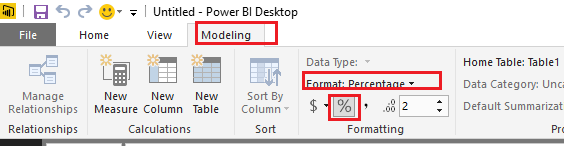
You don't need to use DAX functions to format the value of the measure in this scenario. In Power BI Desktop, you can just use Format option under Modeling tab to format the measure as Vvelarde mentioned above.
You can just use the formula below for the measure "% Profiles Started", then follow steps below to change format to Percentage for it.
% Profiles Started = DIVIDE ( TotalNumberOfSkills, [Total # Resources] )
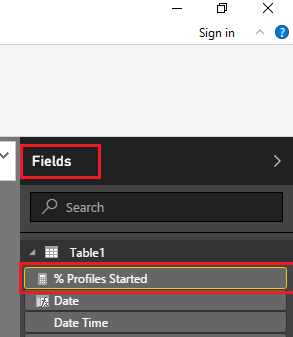
1. Select the measure you want to format on the Fields.
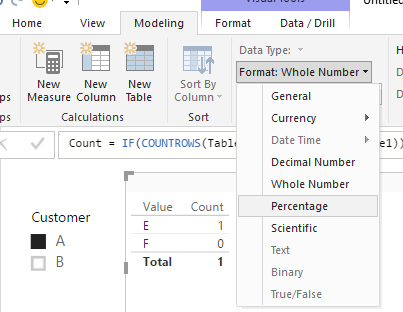
2. Under Modeling tab, just choose Percentage for the Format of the measure.
Regards
Join us in Barcelona for FabCon and SQLCon, the Fabric, Power BI, SQL, and AI community event. Save €200 with code FABCMTY200.
Join Fabric Data Days 2026: 60 days of free live/on-demand sessions, challenges, study groups, and certification opportunities.
| User | Count |
|---|---|
| 23 | |
| 23 | |
| 17 | |
| 13 | |
| 13 |
| User | Count |
|---|---|
| 63 | |
| 41 | |
| 39 | |
| 38 | |
| 38 |