cancel
Showing results for 
Search instead for 
Did you mean: 

We've captured the moments from FabCon & SQLCon that everyone is talking about, and we are bringing them to the community, live and on-demand. Starts on April 14th. Register now

Reply
Anonymous
Not applicable

FORMAT result according with filter and put It in a bar chart

Hi,

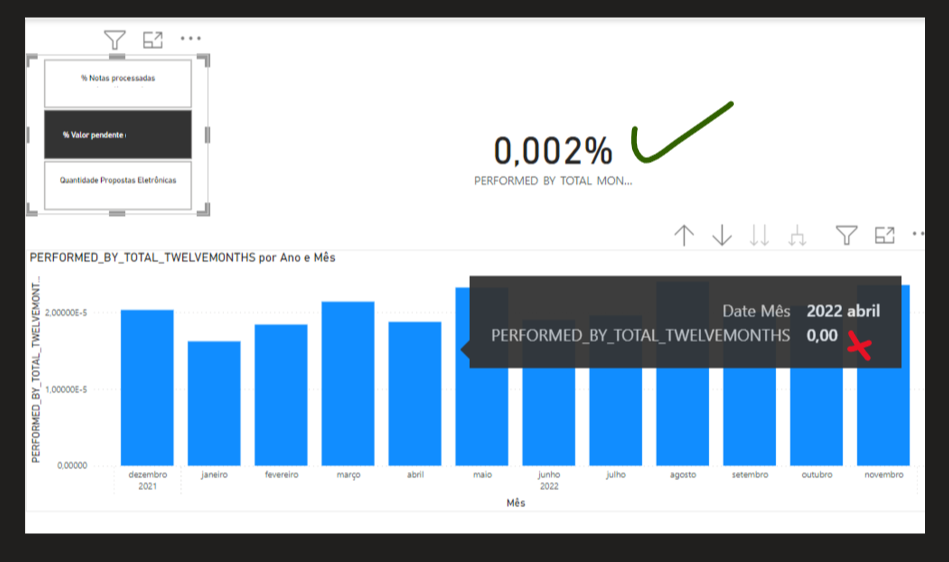
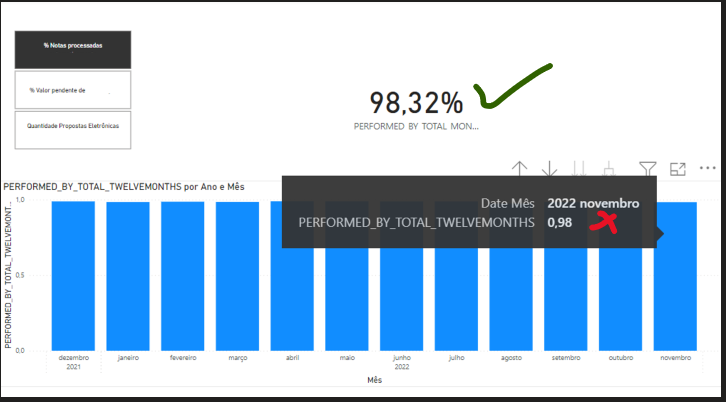
I'm trying to create a code that FORMAT the result according to the selected filter.

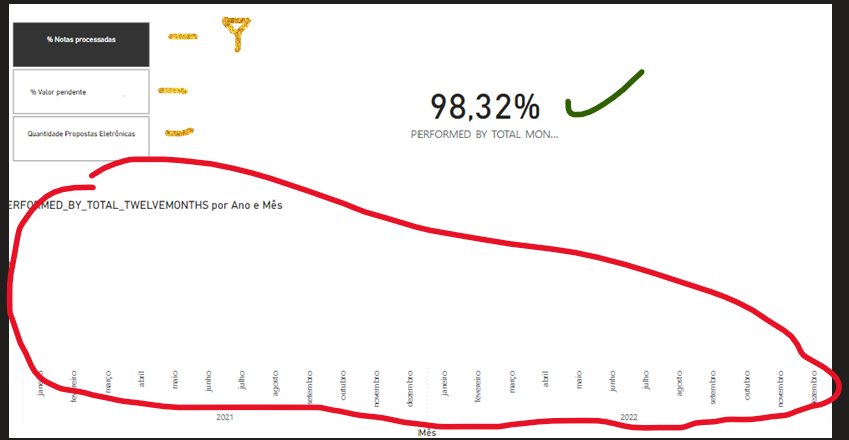
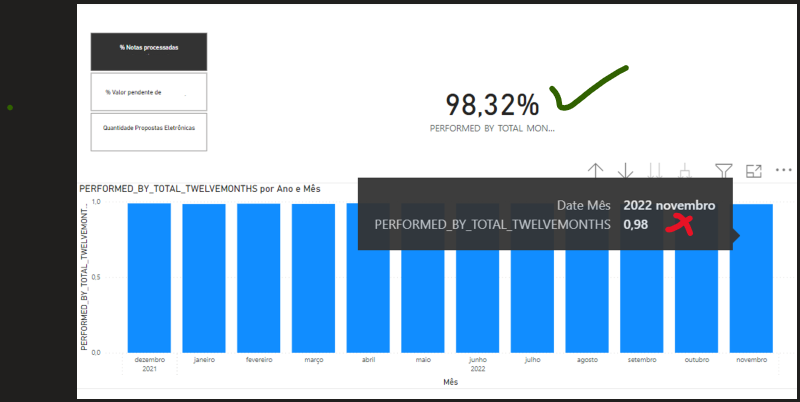
My code works on cards, but It doesn't work on the bar charts.

Can someone help me, please?

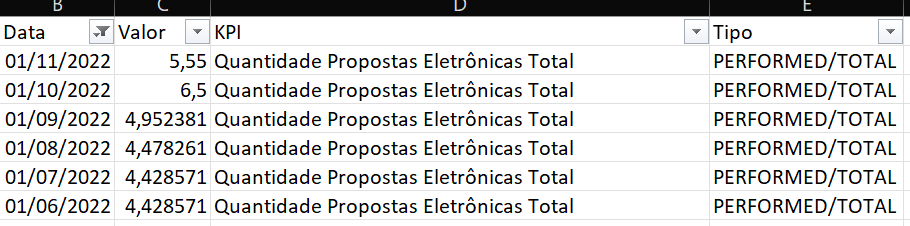
Below there is the DAX code and a data model example.


PERFORMED_BY_TOTAL_TWELVEMONTHS =
VAR _LASTREF =
CALCULATE(
MAX('DBN'[Data]),
'DBN'[Tipo] = "PERFORMED/TOTAL",
'DBN'[Valor] <> BLANK()
)
VAR _ELEVENMONTHSAGO =
EDATE(_LASTREF,-11)
VAR _INDICATOR =
CALCULATE(
SELECTEDVALUE('DBN'[KPI], "ERROR"),
'DBN'[Tipo] = "PERFORMED/TOTAL"
)
VAR _RESULT =
CALCULATE(
SUM('DBN'[Valor]),
'DBN'[Tipo] = "PERFORMED/TOTAL",
'DBN'[Data] >= _ELEVENMONTHSAGO
&& 'DBN'[Data] <= _LASTREF
)
VAR _FORMAT =
IF(
_INDICATOR = "% Valor pendente",
FORMAT(_RESULT, "0.000%"),
IF(
_INDICATOR = "Quantidade Propostas Eletrônicas Total",
FORMAT(_RESULT, "Standard"),
FORMAT(_RESULT, "Percent")
)
)
RETURN
_FORMAT


John_Silva642_0-1671743391427.png

John_Silva642_1-1671743781008.png

Just _RESULT

John_Silva642_2-1671744324328.png


1 ACCEPTED SOLUTION
v-jianboli-msft
Community Support
Community Support

Hi @Anonymous ,


Have you ever considered about using field parameter?

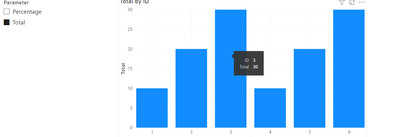
Field parameters allow users to dynamically change the measures or dimensions being analyzed within a report. This feature can help your report readers explore and customize the analysis of the report by selecting the different measures or dimensions they're interested in.

For example:

vjianbolimsft_0-1672209363671.png

Then apply to the visual:

vjianbolimsft_2-1672209433577.png

vjianbolimsft_3-1672209450705.png

For more details, please refer to:

Let report readers use field parameters to change visuals (preview) - Power BI | Microsoft Learn


Best Regards,

Jianbo Li

If this post helps, then please consider Accept it as the solution to help the other members find it more quickly.

View solution in original post

4 REPLIES 4
v-jianboli-msft
Community Support
Community Support

Hi @Anonymous ,


Have you ever considered about using field parameter?

Field parameters allow users to dynamically change the measures or dimensions being analyzed within a report. This feature can help your report readers explore and customize the analysis of the report by selecting the different measures or dimensions they're interested in.

For example:

vjianbolimsft_0-1672209363671.png

Then apply to the visual:

vjianbolimsft_2-1672209433577.png

vjianbolimsft_3-1672209450705.png

For more details, please refer to:

Let report readers use field parameters to change visuals (preview) - Power BI | Microsoft Learn


Best Regards,

Jianbo Li

If this post helps, then please consider Accept it as the solution to help the other members find it more quickly.

Anonymous
Not applicable

It solved my problem. Thank you!

v-jianboli-msft
Community Support
Community Support

Hi @Anonymous ,


You can't use the Format function in your bar chart because it will convert the values to text format, making it unrecognizable to visual.

For more details, refer to:

FORMAT function (DAX) - DAX | Microsoft Learn

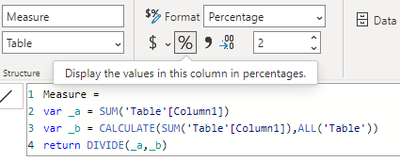
You can change the format of your measure here:

vjianbolimsft_0-1671758206855.png

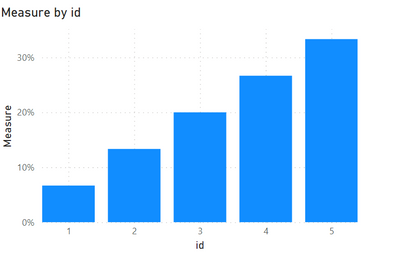
Output:

vjianbolimsft_1-1671758223776.png


Best Regards,

Jianbo Li

If this post helps, then please consider Accept it as the solution to help the other members find it more quickly.

Anonymous
Not applicable

Thanks @v-jianboli-msft

But I need something like the FORMAT function to change the result according to the filter.

Example:

John_Silva642_0-1671807806409.png

Percent FORMAT (Standard)

John_Silva642_1-1671807847089.png

Percent FORMAT (0.000%)

John_Silva642_2-1671807891242.png

Percent FORMAT (Percent)


Helpful resources

Announcements
New to Fabric survey Carousel

New to Fabric Survey

If you have recently started exploring Fabric, we'd love to hear how it's going. Your feedback can help with product improvements.

Power BI DataViz World Championships carousel

Power BI DataViz World Championships - June 2026

A new Power BI DataViz World Championship is coming this June! Don't miss out on submitting your entry.

Join our Fabric User Panel

Join our Fabric User Panel

Share feedback directly with Fabric product managers, participate in targeted research studies and influence the Fabric roadmap.

March Power BI Update Carousel

Power BI Community Update - March 2026

Check out the March 2026 Power BI update to learn about new features.