We've captured the moments from FabCon & SQLCon that everyone is talking about, and we are bringing them to the community, live and on-demand. Starts on April 14th. Register now
Get Data > Other > ODBC
Select data source
Enter a query if necessary
Enter credentials
Receive "Access Denied" error
Presented with "Retry", "Edit" or "Cancel"
Click "Edit"
Prompted to select DSN
Click "OK"
Receive "Access Denied" error.
No way to edit credentials, have to cancel and start over.
Rage.
Solved! Go to Solution.
Hi @ScottBeeson,
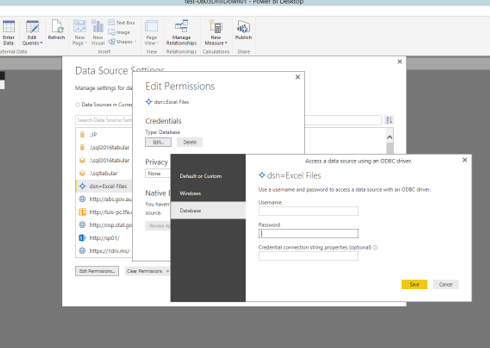
In Power BI Desktop, please go to File>Options and settings>Data source settings, choose Global Permissions, then choose the ODBC source and click “Edit Permissions” to edit your credential. There is an example for your reference.
Thanks,
Lydia Zhang
Hi @ScottBeeson,
In Power BI Desktop, please go to File>Options and settings>Data source settings, choose Global Permissions, then choose the ODBC source and click “Edit Permissions” to edit your credential. There is an example for your reference.
Thanks,
Lydia Zhang
This is good to know but still feels like a failure from a workflow perspective.
If you have recently started exploring Fabric, we'd love to hear how it's going. Your feedback can help with product improvements.
A new Power BI DataViz World Championship is coming this June! Don't miss out on submitting your entry.
| User | Count |
|---|---|
| 56 | |
| 40 | |
| 36 | |
| 18 | |
| 18 |
| User | Count |
|---|---|
| 70 | |
| 67 | |
| 38 | |
| 34 | |
| 23 |