cancel
Showing results for 
Search instead for 
Did you mean: 

Try your skills in the Power BI Dataviz World Championship! Round one ends June 26. Join now

Reply
ScottBeeson
Regular Visitor

[FAIL] Cannot edit credentials when adding an ODBC source

Get Data > Other > ODBC

Select data source

Enter a query if necessary

Enter credentials

Receive "Access Denied" error

Presented with "Retry", "Edit" or "Cancel"

Click "Edit"

Prompted to select DSN

Click "OK"

Receive "Access Denied" error.


No way to edit credentials, have to cancel and start over.


Rage.

1 ACCEPTED SOLUTION
Anonymous
Not applicable

Hi @ScottBeeson,

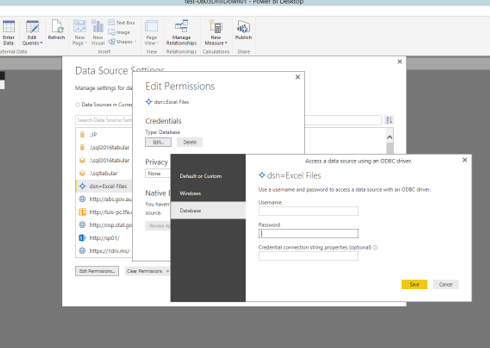
In Power BI Desktop, please go to File>Options and settings>Data source settings, choose Global Permissions, then choose the ODBC source and click “Edit Permissions” to edit your credential.  There is an example for your reference.
Capture.PNG


Thanks,
Lydia Zhang

View solution in original post

2 REPLIES 2
Anonymous
Not applicable

Hi @ScottBeeson,

In Power BI Desktop, please go to File>Options and settings>Data source settings, choose Global Permissions, then choose the ODBC source and click “Edit Permissions” to edit your credential.  There is an example for your reference.
Capture.PNG


Thanks,
Lydia Zhang

This is good to know but still feels like a failure from a workflow perspective.

Helpful resources

Announcements
Fabric Data Days is here Carousel

Fabric Data Days 2026

Don't miss out on Data Days, June 15 through August 7. Learn Fabric, Power BI, SQL, AI and more.

May Power BI Update Carousel

Power BI Monthly Update - May 2026

Check out the May 2026 Power BI update to learn about new features.

Power BI DataViz World Championships carousel

Power BI DataViz World Championships - June 2026

A new Power BI DataViz World Championship is coming this June! Don't miss out on submitting your entry.