Don't miss your chance to take the Fabric Data Engineer (DP-700) exam on us!
Learn moreWe've captured the moments from FabCon & SQLCon that everyone is talking about, and we are bringing them to the community, live and on-demand. Starts on April 14th. Register now
Hello Power BI community,
I have been trying for some time now to figure out the solution to this problem (I am new to Power BI and DAX) but I could not find the solution myself or on the internet. The problem is pretty basic:
I have a table and I would like to extract the unique values from some of the columns. For example, from the following table I would like to have the unique values of columns 1, 2 and 3, so the answer would be A, B, C, D.
A | D | C | 1 |
| A | C | A | 2 |
| B | A | B | 3 |
| C | B | C | 4 |
| D | B | A | 5 |
| D | B | B | 6 |
Thanks in advance (also for redirecting me to relevant posts that I might have missed)!
Hi,
I had a similar need, so i used the following steps:
Created a new table using DAX UNION and DAX SELECTCOLUMNS,
New_table_name=
UNION(
SELECTCOLUMNS(source_table_name,"new_column_name",source_column_name1),
SELECTCOLUMNS(source_table_name,"new_column_name",source_column_name2),
SELECTCOLUMNS(source_table_name,"new_column_name",source_column_name3),
.
.
.
)
this will create a new table, with summarized columns.
On top of this use DAX Measure , DISTINCTCOUNT or COUNTROWS(FILTER(table_name,NOT(ISBLANK(column_name))
This measure will help you to get a pivot table kind of result with individual columns.
From This
to This:
Hello @BI21 ,
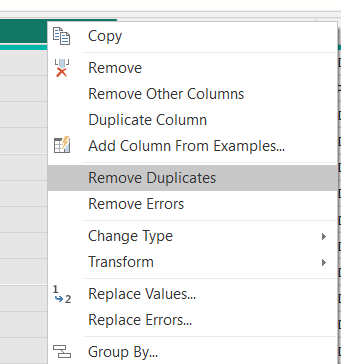
like for example you could in power query, duplicate the table you have then remove all columns except the one you want to extract the values from then right click on this column and choose remove duplicates.
so you'll have every unique value in this column.
If I answered your question, please mark my post as solution so it would appeare to others, Appreciate your Kudos 👍
Proud to be a Super User! | |
Thank you for your hint! However, this only works when I apply it to one of the columns, not to several columns. So when I mark the first two columns of the example data and apply "Remove duplicates", it only removes the last row because the entry "D (in column 1) B (in column2)" is indeed a duplicate but the result is still a table. I want as answer only "A, B, C, D"
If you have recently started exploring Fabric, we'd love to hear how it's going. Your feedback can help with product improvements.
A new Power BI DataViz World Championship is coming this June! Don't miss out on submitting your entry.
Share feedback directly with Fabric product managers, participate in targeted research studies and influence the Fabric roadmap.
| User | Count |
|---|---|
| 51 | |
| 37 | |
| 35 | |
| 19 | |
| 17 |
| User | Count |
|---|---|
| 69 | |
| 65 | |
| 39 | |
| 33 | |
| 23 |