Join us at FabCon Atlanta from March 16 - 20, 2026, for the ultimate Fabric, Power BI, AI and SQL community-led event. Save $200 with code FABCOMM.
Register now!Vote for your favorite vizzies from the Power BI Dataviz World Championship submissions. Vote now!
Hi
I have a data table with survey data of the same respondents over time. Data looks like
Campaign | Respondent | Category Jan2017 | 001a1 | Blue
Jan2017 | 001bb | Orange
Feb2017 | 001a1 | Blue
Feb2017 | 001bb | Blue
Feb2017 | 0012b | Orange
Now I would like to produce a table or a visual on my dashboard that shows how many were Blue in the first campaign and what this segment was in the following campaigns. So if I look at Blue in Jan2017 I would learn that of the 1 that one was Blue in Jan2017 1 was still blue in Feb2017. If I selected Orange in Jan2017 I would learn that none of that segment were Orange again in Feb2017.
I hope it makes sense and you are able to help me.
br, Simon
@SimonKibsgaard wrote:
Hi
I have a data table with survey data of the same respondents over time. Data looks like
Campaign | Respondent | Category Jan2017 | 001a1 | Blue
Jan2017 | 001bb | Orange
Feb2017 | 001a1 | Blue
Feb2017 | 001bb | Blue
Feb2017 | 0012b | OrangeNow I would like to produce a table or a visual on my dashboard that shows how many were Blue in the first campaign and what this segment was in the following campaigns. So if I look at Blue in Jan2017 I would learn that of the 1 that one was Blue in Jan2017 1 was still blue in Feb2017. If I selected Orange in Jan2017 I would learn that none of that segment were Orange again in Feb2017.
I hope it makes sense and you are able to help me.
br, Simon
Try 2 measures
count of respondent in current campaign = IF(HASONEVALUE('table'[Campaign])&&HASONEVALUE('table'[Category]),COUNT('table'[Respondent]),BLANK())
count of respondent in next campaign =
IF (
HASONEVALUE ( 'table'[Campaign] ) && HASONEVALUE ( 'table'[Category] ),
IF (
ISBLANK (
COUNTROWS (
FILTER (
CALCULATETABLE ( 'table', NEXTMONTH ( 'table'[Campaign] ) ),
'table'[Respondent] IN VALUES ( 'table'[Respondent] )
)
)
),
0,
COUNTROWS (
FILTER (
CALCULATETABLE ( 'table', NEXTMONTH ( 'table'[Campaign] ) ),
'table'[Respondent] IN VALUES ( 'table'[Respondent] )
)
)
),
BLANK ()
)
Thnx @Eric_Zhang, but that doesnt quite do the trick
1. there is not always a month between campaigns (but they can have a start date added as a new column, if that would help)
2. We don't know if there are 2 or more campaigns.
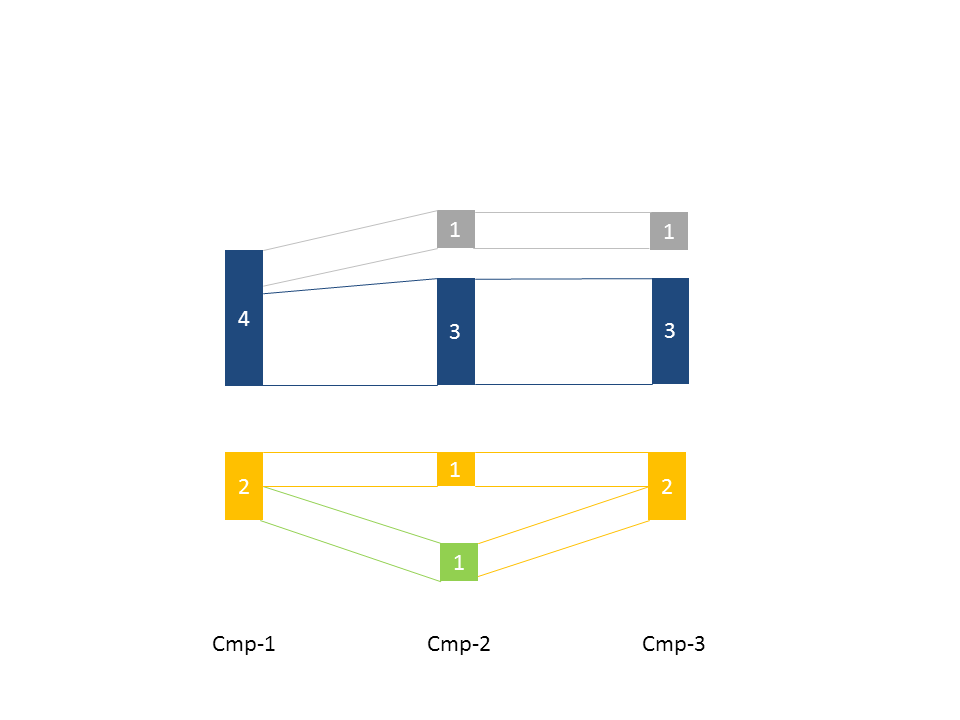
So one of the insights I would like was that "4 respondents were Blue in the first campaign, of those 3 were Blue in second and 1 was Blue in the third campaign"
I guess a sankey diagram would be the ideal way to visualize, but I am not sure how to prepare data or present the diagram.
br, Simon
@SimonKibsgaard wrote:
Thnx @Eric_Zhang, but that doesnt quite do the trick
1. there is not always a month between campaigns (but they can have a start date added as a new column, if that would help)
2. We don't know if there are 2 or more campaigns.
So one of the insights I would like was that "4 respondents were Blue in the first campaign, of those 3 were Blue in second and 1 was Blue in the third campaign"
I guess a sankey diagram would be the ideal way to visualize, but I am not sure how to prepare data or present the diagram.
br, Simon
Well, could you post more specific sample data for your scenario?
Hi @Eric_Zhang
Yes, you're right.
Here is some better example data and a png of the diagram I would like to produce:
DATA:
| Campaign | Respondent | date | Category |
| Cmp-1 | d77e22fd3ffbc37ea7dd63c20dea9f1 | 11-01-2017 00:00 | Blue |
| Cmp-1 | 8a1ed1e1c09617517f4bff8a6c2c16b | 10-01-2017 00:00 | Blue |
| Cmp-1 | 9bd1d31136d45405e1d1b5cca86b4c6 | 10-01-2017 00:00 | Blue |
| Cmp-1 | ece18a9a2462ab2728248b778f15cd3 | 10-01-2017 00:00 | Blue |
| Cmp-1 | 686e3d48a600abd2db8b65c73e0e3c4 | 18-01-2017 00:00 | Orange |
| Cmp-1 | 7611c2f508d3a912d94b6f7e70eebee | 09-01-2017 00:00 | Orange |
| Cmp-2 | d77e22fd3ffbc37ea7dd63c20dea9f1 | 13-02-2017 00:00 | Blue |
| Cmp-2 | 8a1ed1e1c09617517f4bff8a6c2c16b | 10-02-2017 00:00 | Blue |
| Cmp-2 | 9bd1d31136d45405e1d1b5cca86b4c6 | 08-03-2017 00:00 | Blue |
| Cmp-2 | ece18a9a2462ab2728248b778f15cd3 | 08-03-2017 00:00 | Grey |
| Cmp-2 | 7611c2f508d3a912d94b6f7e70eebee | 09-02-2017 00:00 | Lime |
| Cmp-2 | 686e3d48a600abd2db8b65c73e0e3c4 | 09-02-2017 00:00 | Orange |
| Cmp-3 | d77e22fd3ffbc37ea7dd63c20dea9f1 | 03-04-2017 00:00 | Blue |
| Cmp-3 | 8a1ed1e1c09617517f4bff8a6c2c16b | 04-04-2017 00:00 | Blue |
| Cmp-3 | 9bd1d31136d45405e1d1b5cca86b4c6 | 04-04-2017 00:00 | Blue |
| Cmp-3 | ece18a9a2462ab2728248b778f15cd3 | 31-03-2017 00:00 | Grey |
| Cmp-3 | 7611c2f508d3a912d94b6f7e70eebee | 12-04-2017 00:00 | Orange |
| Cmp-3 | 686e3d48a600abd2db8b65c73e0e3c4 | 06-04-2017 00:00 | Orange |
DIAGRAM:
Anyone with and idea for how to solve this? Maybe sankey diagram isn't the right solution?
Fingers crossed hoping for a bright idea...
Vote for your favorite vizzies from the Power BI World Championship submissions!
If you love stickers, then you will definitely want to check out our Community Sticker Challenge!
Check out the January 2026 Power BI update to learn about new features.
| User | Count |
|---|---|
| 64 | |
| 53 | |
| 42 | |
| 20 | |
| 17 |
| User | Count |
|---|---|
| 123 | |
| 104 | |
| 44 | |
| 32 | |
| 24 |