cancel
Showing results for 
Search instead for 
Did you mean: 

We've captured the moments from FabCon & SQLCon that everyone is talking about, and we are bringing them to the community, live and on-demand. Starts on April 14th. Register now

Reply
sethsanu
Frequent Visitor

Extract numbers from text

What's the most efficient way to extract numbers from a column that has a combination of both numbers and text? E.g.


1

1234

"hello World"

0

"arbitrary text"

should return


1

1234

null

0

null


Is there an M / PowerQuery formula for this scenario equaivalent to the t-sql "try_cast" or "try_convert"?

1 ACCEPTED SOLUTION
Anonymous
Not applicable

In DAX you can use ISNUMBER.

OK I should have tested that first. You were actually on the right track anyway. ISERROR(VALUE(TableName[ColumnName])) will return true if the value isn't a number, false if it is a number.


In Power Query it's a two-step formula but you can nest them: Value.Is(Value.FromText([ColumnName]), Int64.Type) will return true if the row contains a number value, false if not.

View solution in original post

4 REPLIES 4
Anonymous
Not applicable

Hi @sethsanu,

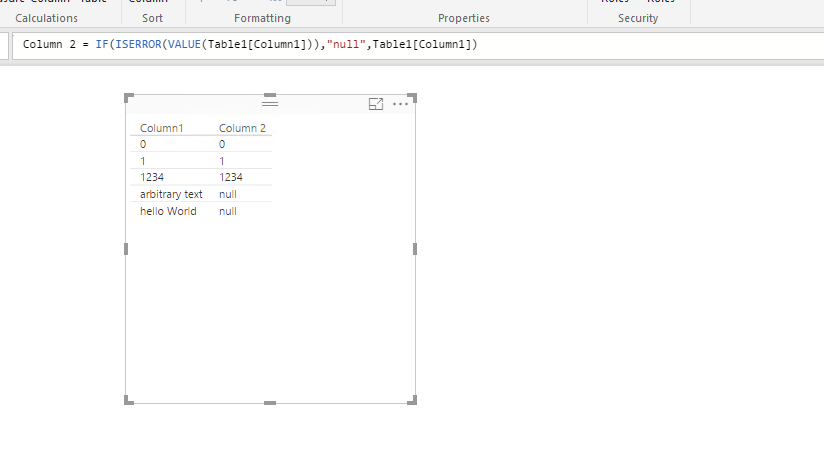
Adding to other’s post, to output the column to the your desired format, just create a new calculated column using this formula: Column 2 = IF(ISERROR(VALUE(Table1[Column1])),"null",Table1[Column1]), for more details, please check the following screenshot

1.PNG


Thanks,
Lydia Zhang

Anonymous
Not applicable

@Anonymous that would come out to be a text column wouldn't it? I think @sethsanu meant he wanted a null result for text rows, rather than the actual text "null" but I could be mistaken.

Correct - I need to do the exclusion prior to importing at the M level. Thanks KHoreman - the M query test works fine! (marked as solution)

Anonymous
Not applicable

In DAX you can use ISNUMBER.

OK I should have tested that first. You were actually on the right track anyway. ISERROR(VALUE(TableName[ColumnName])) will return true if the value isn't a number, false if it is a number.


In Power Query it's a two-step formula but you can nest them: Value.Is(Value.FromText([ColumnName]), Int64.Type) will return true if the row contains a number value, false if not.

Helpful resources

Announcements
New to Fabric survey Carousel

New to Fabric Survey

If you have recently started exploring Fabric, we'd love to hear how it's going. Your feedback can help with product improvements.

Power BI DataViz World Championships carousel

Power BI DataViz World Championships - June 2026

A new Power BI DataViz World Championship is coming this June! Don't miss out on submitting your entry.

Join our Fabric User Panel

Join our Fabric User Panel

Share feedback directly with Fabric product managers, participate in targeted research studies and influence the Fabric roadmap.

March Power BI Update Carousel

Power BI Community Update - March 2026

Check out the March 2026 Power BI update to learn about new features.