Join us in Barcelona for FabCon and SQLCon, September 28 - October 1, 2026.
This is best Fabric, Power BI, SQL and AI community event. How do we know? The last event sold out! Save €200 with code FABCMTY200.
Register now- Power BI forums
- Get Help with Power BI
- Desktop
- Service
- Report Server
- Power Query
- Mobile Apps
- Developer
- DAX Commands and Tips
- Custom Visuals Development Discussion
- Health and Life Sciences
- Power BI Spanish forums
- Translated Spanish Desktop
- Training and Consulting
- Instructor Led Training
- Dashboard in a Day for Women, by Women
- Galleries
- Data Stories Gallery
- Themes Gallery
- Contests Gallery
- QuickViz Gallery
- Quick Measures Gallery
- Visual Calculations Gallery
- Fabric Apps Gallery
- Notebook Gallery
- Translytical Task Flow Gallery
- TMDL Gallery
- R Script Showcase
- Webinars and Video Gallery
- Ideas
- Custom Visuals Ideas (read-only)
- Issues
- Issues
- Events
- Upcoming Events
The Fabric community is now in read-only for platform upgrade. Learn more
- Power BI forums
- Forums
- Get Help with Power BI
- Desktop
- Re: Extract data from Mongo DB using R
- Subscribe to RSS Feed
- Mark Topic as New
- Mark Topic as Read
- Float this Topic for Current User
- Bookmark
- Subscribe
- Printer Friendly Page


- Mark as New
- Bookmark
- Subscribe
- Mute
- Subscribe to RSS Feed
- Permalink
Extract data from Mongo DB using R
Hi,
I have connected my Power BI desktop with Mongo DB using R already.
I am able to see the data inside my collection.
Problem Statement
The data stored in Mongo has nested JSON array which is not readable to Power BI Directly. I have tried writing different type of query but i am not able to access the child elements of the data.
Sample Data
{

	"imageName": "5a6188cceaf68a74e499de66_humanDetection_1516342489874.jpg",
	"createdAt": "1516342487874",
	"resultCount": "1",
	"camId": "5a6188cceaf68a74e499de66",
	"result": [{
		"id": "0",
		"bboxes": {
			"y2": "736",
			"y1": "257",
			"x2": "961",
			"x1": "751"
		},
		"areaOfInterestId": "5a618ccc926866aa7464529a"
	}]
}
Query Tried:
= R.Execute("library(mongolite)
  m<-mongo(collection="""&Text.From(Collection)&""",db = """&Text.From(Database)&""",url=paste(""mongodb://"","""&Text.From(Username)&""","":"","""&Text.From(Password)&""",""@"","""&Text.From(Server)&""","":"","""&Text.From(Port)&""",""/"","""&Text.From(Database)&""",sep=''), verbose = FALSE)#(lf)Query<-m$find(query = ""{}"", fields = ""{\""_id\"":1,\""resultCount\"":1,\""resukt.bboxes.y2\"":1}"", sort = ""{}"", skip = 0, limit = 0, handler = NULL, pagesize = 1000)")
Kindly help in accessing the elements inside bboxes in Result array.
Prateek Raina
@ImkeF: Need your help on this.


- Mark as New
- Bookmark
- Subscribe
- Mute
- Subscribe to RSS Feed
- Permalink
@prateekraina @ImkeF how are you able to connect to MongoDB using R? please help as I need to use the same set-up instead of ODBC. Thank you.

- Mark as New
- Bookmark
- Subscribe
- Mute
- Subscribe to RSS Feed
- Permalink
- Mark as New
- Bookmark
- Subscribe
- Mute
- Subscribe to RSS Feed
- Permalink
Hi @Anonymous ,
No, unfortunately I was not able to get solution for this.
Regards,
Prateek Raina


- Mark as New
- Bookmark
- Subscribe
- Mute
- Subscribe to RSS Feed
- Permalink
Hey,
try something like
let
    RSC = R.Execute("library(mongolite)  m<-mongo(collection="""&Text.From(Collection)&""",db = """&Text.From(Database)&""",url=paste(""mongodb://"","""&Text.From(Username)&""","":"","""&Text.From(Password)&""",""@"","""&Text.From(Server)&""","":"","""&Text.From(Port)&""",""/"","""&Text.From(Database)&""",sep=''), verbose = FALSE)#(lf)Query<-m$find(query = ""{}"", fields = ""{\""_id\"":1,\""resultCount\"":1,\""resukt.bboxes.y2\"":1}"", sort = ""{}"", skip = 0, limit = 0, handler = NULL, pagesize = 1000)") ,
   Source = Json.Document(RSC)
in
    Source
in Query Editor (View-->Advanced Editor)
- Mark as New
- Bookmark
- Subscribe
- Mute
- Subscribe to RSS Feed
- Permalink
Thanks for responding but this is not working. I tried below as you mentioned:
let
    RSC = R.Execute("library(mongolite)
  m<-mongo(collection="""&Text.From(Collection)&""",db = """&Text.From(Database)&""",url=paste(""mongodb://"","""&Text.From(Username)&""","":"","""&Text.From(Password)&""",""@"","""&Text.From(Server)&""","":"","""&Text.From(Port)&""",""/"","""&Text.From(Database)&""",sep=''), verbose = FALSE)#(lf)Query<-m$find(query = ""{}"", fields = ""{\""_id\"":1,\""resultCount\"":1,\""result.bboxes.y2\"":1}"", sort = ""{}"", skip = 0, limit = 0, handler = NULL, pagesize = 1000)"),
    Source = Json.Document(RSC)
in
    Source
Step 1 is successful.
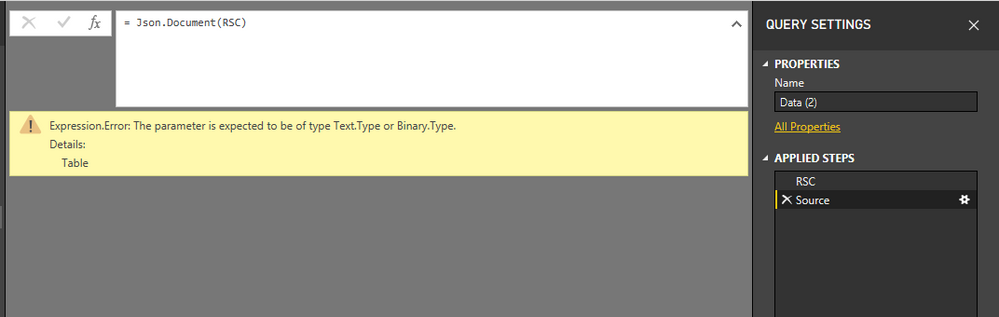
However, step 2 is throwing below error:
Expression.Error: The parameter is expected to be of type Text.Type or Binary.Type
Prateek Raina

- Mark as New
- Bookmark
- Subscribe
- Mute
- Subscribe to RSS Feed
- Permalink
Hi,
you have to use your result column (with the JSON data) in
Source = Json.Document(RSC.result)
But you have to look for the right syntax, cause I currently have no test data.
- Mark as New
- Bookmark
- Subscribe
- Mute
- Subscribe to RSS Feed
- Permalink
Hi @WolfBiber,
Is it not possible for you to look at the Step 1 snapshot and figure out the syntax based on the columns which are returned?
Prateek Raina


- Mark as New
- Bookmark
- Subscribe
- Mute
- Subscribe to RSS Feed
- Permalink
Hi @prateekraina,
so you want to extract the JSON-record in R an return the content of the sub-record bboxes as a table to Power BI?
This script works for me (with a link to the local json:
library(jsonlite)
json <- jsonlite::fromJSON("C:..Filepath/JsonMongoPrateek.json")
out <- json$result$bboxes
You can navigate with "$" through the nodes.
Imke Feldmann (The BIccountant)
If you liked my solution, please give it a thumbs up. And if I did answer your question, please mark this post as a solution. Thanks!
How to integrate M-code into your solution -- How to get your questions answered quickly -- How to provide sample data -- Check out more PBI- learning resources here -- Performance Tipps for M-queries
- Mark as New
- Bookmark
- Subscribe
- Mute
- Subscribe to RSS Feed
- Permalink
Hi @ImkeF,
It's great to hear from you. Actually, i need to use Mongolite as i am fetching the data from Mongo DB.
I would request you to go through the problem statement once again.
Prateek Raina
- Mark as New
- Bookmark
- Subscribe
- Mute
- Subscribe to RSS Feed
- Permalink
All I can recommend is to extract the full JSON from Mongo to R via the R-script in the query editor.
Once you have the JSON in R, you can use parts of my script to extract the inner parts there.
I have no clue how to do the extraction on MongoDB-level.
Imke Feldmann (The BIccountant)
If you liked my solution, please give it a thumbs up. And if I did answer your question, please mark this post as a solution. Thanks!
How to integrate M-code into your solution -- How to get your questions answered quickly -- How to provide sample data -- Check out more PBI- learning resources here -- Performance Tipps for M-queries
- Mark as New
- Bookmark
- Subscribe
- Mute
- Subscribe to RSS Feed
- Permalink
Hi @ImkeF,
The main issue is how to extract the full JSON from Mongo to R.
Using Mongolite i have not seen anywhere on internet of someone had tried to access a nested json array.
Can you please tag any expert who might have answer to this?
Prateek Raina
- Mark as New
- Bookmark
- Subscribe
- Mute
- Subscribe to RSS Feed
- Permalink
Sorry, but I don't know who is using this db.
I'd suggest to post your question on stackoverflow in the R-section (or Mongo).
Imke Feldmann (The BIccountant)
If you liked my solution, please give it a thumbs up. And if I did answer your question, please mark this post as a solution. Thanks!
How to integrate M-code into your solution -- How to get your questions answered quickly -- How to provide sample data -- Check out more PBI- learning resources here -- Performance Tipps for M-queries
- Mark as New
- Bookmark
- Subscribe
- Mute
- Subscribe to RSS Feed
- Permalink
Facing the same issue did you get any solution for this and also can you explain how you connected to MongoDB using R in power bi
Helpful resources

FabCon & SQLCon – Barcelona 2026
Join us in Barcelona for FabCon and SQLCon, the Fabric, Power BI, SQL, and AI community event. Save €200 with code FABCMTY200.

Power BI DataViz World Championships - June 2026
A new Power BI DataViz World Championship is coming this June! Don't miss out on submitting your entry.

| User | Count |
|---|---|
| 23 | |
| 22 | |
| 14 | |
| 14 | |
| 13 |


| User | Count |
|---|---|
| 47 | |
| 39 | |
| 24 | |
| 20 | |
| 20 |


