Join us in Barcelona for FabCon and SQLCon, September 28 - October 1, 2026.
This is best Fabric, Power BI, SQL and AI community event. How do we know? The last event sold out! Save €200 with code FABCMTY200.
Register now- Power BI forums
- Get Help with Power BI
- Desktop
- Service
- Report Server
- Power Query
- Mobile Apps
- Developer
- DAX Commands and Tips
- Custom Visuals Development Discussion
- Health and Life Sciences
- Power BI Spanish forums
- Translated Spanish Desktop
- Training and Consulting
- Instructor Led Training
- Dashboard in a Day for Women, by Women
- Galleries
- Data Stories Gallery
- Themes Gallery
- Contests Gallery
- QuickViz Gallery
- Quick Measures Gallery
- Visual Calculations Gallery
- Fabric Apps Gallery
- Notebook Gallery
- Translytical Task Flow Gallery
- TMDL Gallery
- R Script Showcase
- Webinars and Video Gallery
- Ideas
- Custom Visuals Ideas (read-only)
- Issues
- Issues
- Events
- Upcoming Events
The Fabric community is now in read-only for platform upgrade. Learn more
- Power BI forums
- Forums
- Get Help with Power BI
- Desktop
- Re: External Tools - Missing from Ribbon
- Subscribe to RSS Feed
- Mark Topic as New
- Mark Topic as Read
- Float this Topic for Current User
- Bookmark
- Subscribe
- Printer Friendly Page

- Mark as New
- Bookmark
- Subscribe
- Mute
- Subscribe to RSS Feed
- Permalink
External Tools - Missing from Ribbon
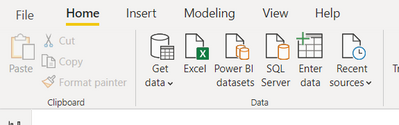
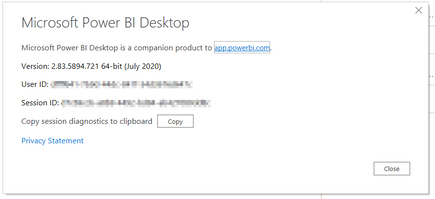
I've downloaded the July update but am missing the External Tools tab from the ribbon.
Am I missing something or does it have limited availability?
Solved! Go to Solution.


- Mark as New
- Bookmark
- Subscribe
- Mute
- Subscribe to RSS Feed
- Permalink
@rodjarman , You need to lastest version of power BI and Latest version One of three tools.
I had an old version of Dax studio, it did not come. I updated Dax studio to the latest version, it came.

- Mark as New
- Bookmark
- Subscribe
- Mute
- Subscribe to RSS Feed
- Permalink
you must have an external folder inside the Power BI desktop if its missing then you can create it manually
like
64-bit installer path
C:\Program Files\Common Files\microsoft shared\Power BI Desktop\External Tools
now all the external tool installation should be done inside the external tool folder
if you are using 32bit installer then the path of the folder would be
C:\Program Files (x86)\Common Files\microsoft shared\Power BI Desktop\External Tools
once its done , external tool will start appearing

- Mark as New
- Bookmark
- Subscribe
- Mute
- Subscribe to RSS Feed
- Permalink
I have Power BI Desktop (January 2021) Optimised for Reporting Services. I do not have the External Tools option in the menu. What do I need to do?


- Mark as New
- Bookmark
- Subscribe
- Mute
- Subscribe to RSS Feed
- Permalink
The accepted solution is correct and here's more information: https://www.youtube.com/watch?v=jScicVBrr0s
However, be aware that if you have installed Power BI Desktop or the external tools in a drive other than the C drive (like I have), you may get an error message saying "Unable to launch external tool - DAX Studio executable not found. Contact the tool author for support". This is because the JSON file that is installed defaults to drive C. I had to manually modify the JSON file to the correct path to get it to work. I'm sure the providers of these external tools will fix this in a future release, but hope this gets you going.
- Mark as New
- Bookmark
- Subscribe
- Mute
- Subscribe to RSS Feed
- Permalink
@rodjarman , You need to lastest version of power BI and Latest version One of three tools.
I had an old version of Dax studio, it did not come. I updated Dax studio to the latest version, it came.


- Mark as New
- Bookmark
- Subscribe
- Mute
- Subscribe to RSS Feed
- Permalink
Hi, @amitchandak I have latest versions of PBI Desktop and DAX studio, still it External Tool menu is not showing. Am I missing something?
TIA!
- Mark as New
- Bookmark
- Subscribe
- Mute
- Subscribe to RSS Feed
- Permalink
I managed to resolve by reinstalling for all accounts on the computer.

- Mark as New
- Bookmark
- Subscribe
- Mute
- Subscribe to RSS Feed
- Permalink
Thanks! Have to install for all users in Windows 11 laptop.


- Mark as New
- Bookmark
- Subscribe
- Mute
- Subscribe to RSS Feed
- Permalink
hi,
could you provide more details ? what exacly you mean all accounts ?
as i also can't show up external tools.
no dax studio installed, just BI desktop and gateways.
thanks
- Mark as New
- Bookmark
- Subscribe
- Mute
- Subscribe to RSS Feed
- Permalink
Thanks, that did the trick. Much appreciated.
Helpful resources

FabCon & SQLCon – Barcelona 2026
Join us in Barcelona for FabCon and SQLCon, the Fabric, Power BI, SQL, and AI community event. Save €200 with code FABCMTY200.

Power BI DataViz World Championships - June 2026
A new Power BI DataViz World Championship is coming this June! Don't miss out on submitting your entry.

| User | Count |
|---|---|
| 23 | |
| 22 | |
| 14 | |
| 14 | |
| 13 |


| User | Count |
|---|---|
| 47 | |
| 39 | |
| 24 | |
| 20 | |
| 20 |


