Join us in Barcelona for FabCon and SQLCon, September 28 - October 1, 2026.
This is best Fabric, Power BI, SQL and AI community event. How do we know? The last event sold out! Save €200 with code FABCMTY200.
Register now- Power BI forums
- Get Help with Power BI
- Desktop
- Service
- Report Server
- Power Query
- Mobile Apps
- Developer
- DAX Commands and Tips
- Custom Visuals Development Discussion
- Health and Life Sciences
- Power BI Spanish forums
- Translated Spanish Desktop
- Training and Consulting
- Instructor Led Training
- Dashboard in a Day for Women, by Women
- Galleries
- Data Stories Gallery
- Themes Gallery
- Contests Gallery
- QuickViz Gallery
- Quick Measures Gallery
- Visual Calculations Gallery
- Fabric Apps Gallery
- Notebook Gallery
- Translytical Task Flow Gallery
- TMDL Gallery
- R Script Showcase
- Webinars and Video Gallery
- Ideas
- Custom Visuals Ideas (read-only)
- Issues
- Issues
- Events
- Upcoming Events
The Fabric community is upgrading! Read all of the details including the timeline and what you can expect. Learn more
- Power BI forums
- Forums
- Get Help with Power BI
- Desktop
- Re: Expression.syntaxerror: token indetified expec...
- Subscribe to RSS Feed
- Mark Topic as New
- Mark Topic as Read
- Float this Topic for Current User
- Bookmark
- Subscribe
- Printer Friendly Page

- Mark as New
- Bookmark
- Subscribe
- Mute
- Subscribe to RSS Feed
- Permalink
- Report Inappropriate Content
Expression.syntaxerror: token indetified expected
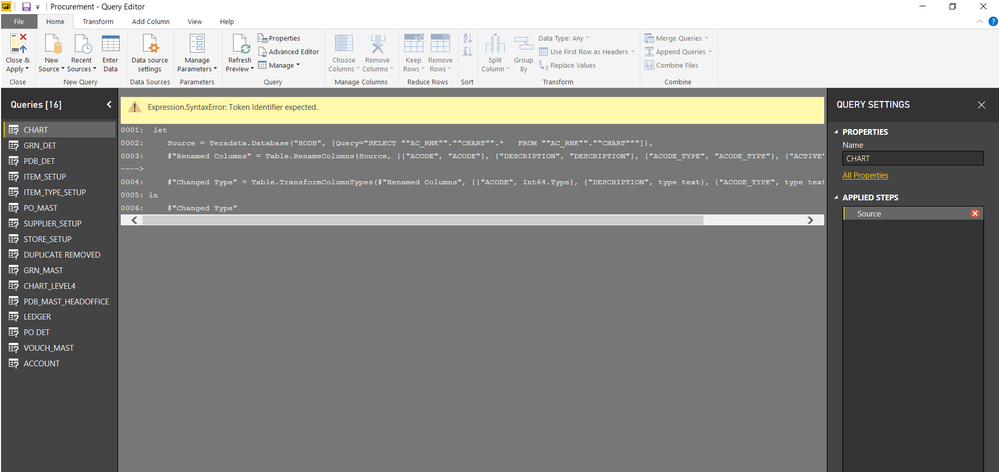
Plz help me, how to tackle this issue that i get when i try to edit a table imported as excel content from powerpivot.
The same error shows up when i hit refresh on the table which is imported from excel file as excel content.
Thanks.
Solved! Go to Solution.


- Mark as New
- Bookmark
- Subscribe
- Mute
- Subscribe to RSS Feed
- Permalink
- Report Inappropriate Content
Hi @TAUSEEF,
Based on my assumption, your Power Query should be like below, please directly paste it to the Advanced Editor.
let
    Source = Teradata.Database("HODB", [Query="SELECT ""AC_RNK"".""CHART"".*   FROM ""AC_RNK"".""CHART"""]),
    #"Renamed Columns" = Table.RenameColumns(Source, {{"ACODE", "ACODE"}, {"DESCRIPTION", "DESCRIPTION"}, {"ACODE_TYPE", "ACODE_TYPE"}, {"ACTIVE", "ACTIVE"}}),
    #"Changed Type" = Table.TransformColumnTypes(#"Renamed Columns", {{"ACODE", Int64.Type}, {"DESCRIPTION", type text}, {"ACODE_TYPE", type text}, {"ACTIVE", type text}})

in
    #"Changed Type"
Regards,
Yuliana Gu
If this post helps, then please consider Accept it as the solution to help the other members find it more quickly.


- Mark as New
- Bookmark
- Subscribe
- Mute
- Subscribe to RSS Feed
- Permalink
- Report Inappropriate Content
Can you provide code of your M (PowerQuery) script here? Go to Advanced editor and copy it?
It will be easier to help you.
Regards,
Ruslan
- Mark as New
- Bookmark
- Subscribe
- Mute
- Subscribe to RSS Feed
- Permalink
- Report Inappropriate Content
let
Source = #!" let#(cr)#(lf) Source = Teradata.Database(""HODB"", [Query=""SELECT """"AC_RNK"""".""""CHART"""".* FROM """"AC_RNK"""".""""CHART""""""]),#(cr)#(lf) #""Renamed Columns"" = Table.RenameColumns(Source, {{""ACODE"", ""ACODE""}, {""DESCRIPTION"", ""DESCRIPTION""}, {""ACODE_TYPE"", ""ACODE_TYPE""}, {""ACTIVE"", ""ACTIVE""}}),,#(cr)#(lf) #""Changed Type"" = Table.TransformColumnTypes(#""Renamed Columns"", {{""ACODE"", Int64.Type}, {""DESCRIPTION"", type text}, {""ACODE_TYPE"", type text}, {""ACTIVE"", type text}})#(cr)#(lf)in#(cr)#(lf) #""Changed Type"""
in
Source
- Mark as New
- Bookmark
- Subscribe
- Mute
- Subscribe to RSS Feed
- Permalink
- Report Inappropriate Content
I see there an extra comma after text {""ACTIVE"", ""ACTIVE""}})
Please remove one.
Regards,
Ruslan
- Mark as New
- Bookmark
- Subscribe
- Mute
- Subscribe to RSS Feed
- Permalink
- Report Inappropriate Content
i have tried removing it {""ACTIVE"", ""ACTIVE""}}),, but the editor wont accept it. Before i removed the editor showed no syntax error.
- Mark as New
- Bookmark
- Subscribe
- Mute
- Subscribe to RSS Feed
- Permalink
- Report Inappropriate Content
Did you remove only one comma via Advanced Editor? See on the picture:

Regards,
Ruslan


- Mark as New
- Bookmark
- Subscribe
- Mute
- Subscribe to RSS Feed
- Permalink
- Report Inappropriate Content
- Mark as New
- Bookmark
- Subscribe
- Mute
- Subscribe to RSS Feed
- Permalink
- Report Inappropriate Content
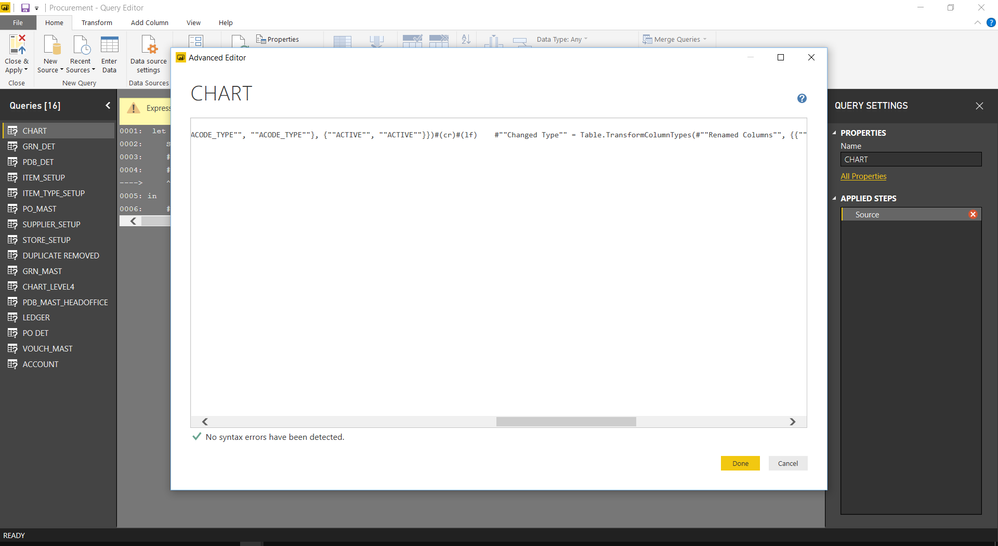
After doing this the error that showed earlier was convertered to token comma expected.
- Mark as New
- Bookmark
- Subscribe
- Mute
- Subscribe to RSS Feed
- Permalink
- Report Inappropriate Content
Hi @TAUSEEF,
Based on my assumption, your Power Query should be like below, please directly paste it to the Advanced Editor.
let
    Source = Teradata.Database("HODB", [Query="SELECT ""AC_RNK"".""CHART"".*   FROM ""AC_RNK"".""CHART"""]),
    #"Renamed Columns" = Table.RenameColumns(Source, {{"ACODE", "ACODE"}, {"DESCRIPTION", "DESCRIPTION"}, {"ACODE_TYPE", "ACODE_TYPE"}, {"ACTIVE", "ACTIVE"}}),
    #"Changed Type" = Table.TransformColumnTypes(#"Renamed Columns", {{"ACODE", Int64.Type}, {"DESCRIPTION", type text}, {"ACODE_TYPE", type text}, {"ACTIVE", type text}})

in
    #"Changed Type"
Regards,
Yuliana Gu
If this post helps, then please consider Accept it as the solution to help the other members find it more quickly.
- Mark as New
- Bookmark
- Subscribe
- Mute
- Subscribe to RSS Feed
- Permalink
- Report Inappropriate Content
Hi @TAUSEEF,
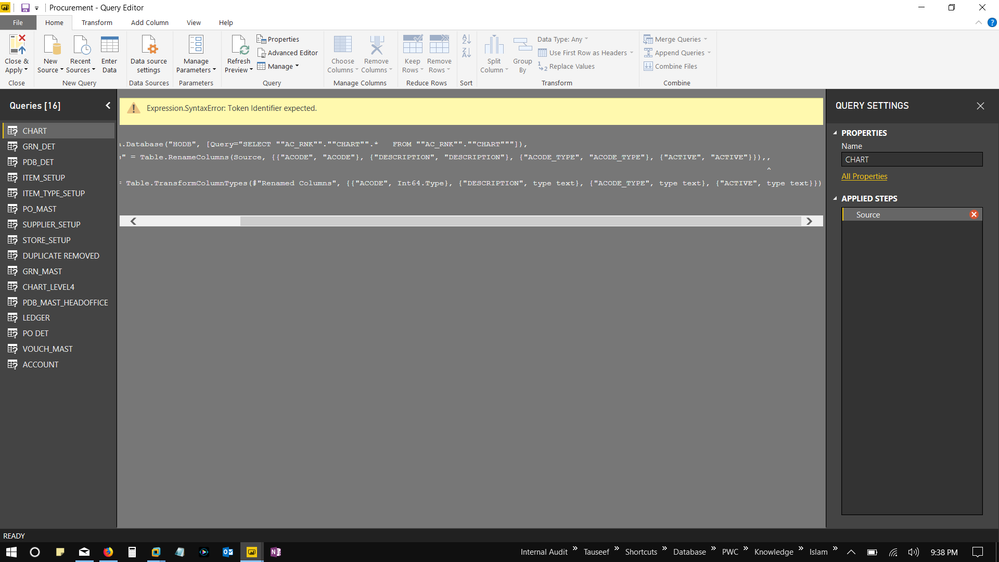
Could you please the right side ( drag the bar on the right side) because we cannot see this part in order to find wich token is really missing.
Show the whole image and I can assist.
Ninter
- Mark as New
- Bookmark
- Subscribe
- Mute
- Subscribe to RSS Feed
- Permalink
- Report Inappropriate Content

Helpful resources

FabCon & SQLCon – Barcelona 2026
Join us in Barcelona for FabCon and SQLCon, the Fabric, Power BI, SQL, and AI community event. Save €200 with code FABCMTY200.

Power BI DataViz World Championships - June 2026
A new Power BI DataViz World Championship is coming this June! Don't miss out on submitting your entry.

| User | Count |
|---|---|
| 24 | |
| 22 | |
| 20 | |
| 18 | |
| 14 |


| User | Count |
|---|---|
| 31 | |
| 26 | |
| 23 | |
| 20 | |
| 20 |


