
cancel
Showing results for 
Search instead for 
Did you mean: 

Join the FabCon + SQLCon recap series. Up next: Power BI, Real-Time Intelligence, IQ and AI, and Data Factory take center stage. All sessions are available on-demand after the live show. Register now

Reply
Anonymous
Not applicable

Exporting underlying data from visuals

Hi all,


Is it posible to export underlying data when selecting a specific data point in visuals.


For example, in this line graph below- I only want the underlying data for the cases in April (133).

 When i click on April, the visual line graph and card visual updates to show 133 cases , however when i export the underlying data it still gives me detail for all the months (April-March 1726). 


Is it possible to only extract the underlying data for the month/s that i have drilled down to?


Capture.PNG

1 ACCEPTED SOLUTION
amitchandak
Super User
Super User

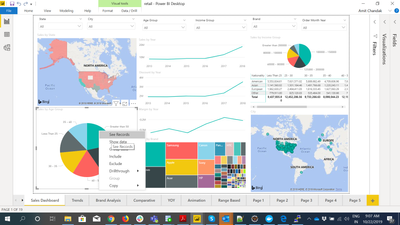
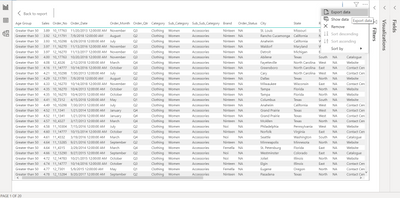
Right Click on the data point and use see records option from the menu. In Show data, you have the option to export.


That will download underlying data.

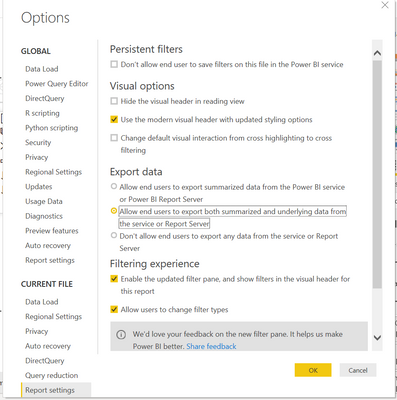
Make sure the Screenshot 2019-10-22 09.07.59.pngScreenshot 2019-10-22 09.07.24.pngScreenshot 2019-10-22 07.41.56.pngsetting is enabled.


Share with Power BI Enthusiasts: Full Power BI Video (20 Hours) YouTube
Microsoft Fabric Series 60+ Videos YouTube
Microsoft Fabric Hindi End to End YouTube

View solution in original post

3 REPLIES 3
amitchandak
Super User
Super User

Right Click on the data point and use see records option from the menu. In Show data, you have the option to export.


That will download underlying data.

Make sure the Screenshot 2019-10-22 09.07.59.pngScreenshot 2019-10-22 09.07.24.pngScreenshot 2019-10-22 07.41.56.pngsetting is enabled.


Share with Power BI Enthusiasts: Full Power BI Video (20 Hours) YouTube
Microsoft Fabric Series 60+ Videos YouTube
Microsoft Fabric Hindi End to End YouTube
Anonymous
Not applicable

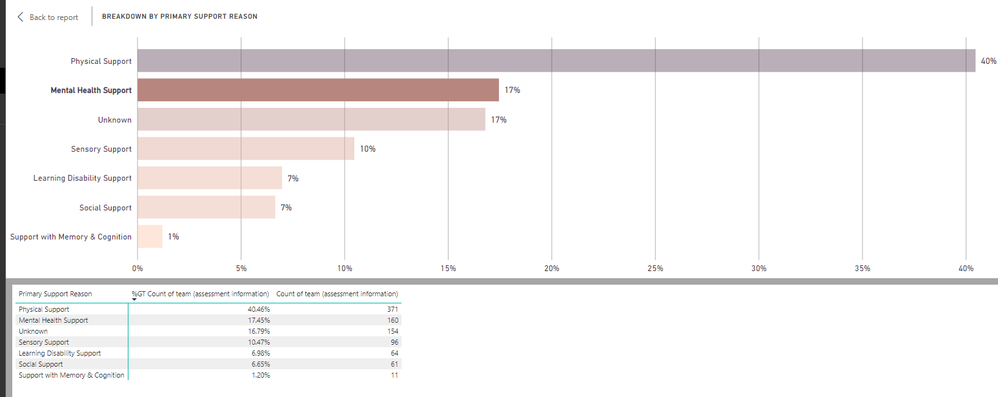
Thanks @amitchandak for the response. I can see that this method works for graphs where there the data is a is number, but I couldn't get the underlying data when the value is percentage. Do you know if this possible to do this?


Many thanksbar graph.png


v-lid-msft
Community Support
Community Support

Hi @Anonymous ,


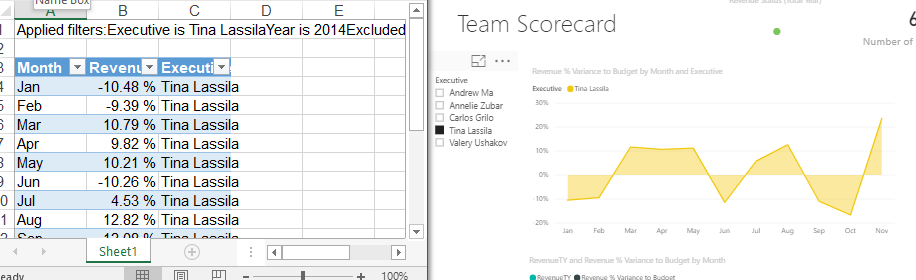
Based on this documentIf you applied filters to the visualization, the exported data will export as filtered. But drilldown is not supported to filter exported data, we suggested add a slicer or filter when you want to export part of underlying data.


4.PNG


Best regards,

Community Support Team _ Dong Li
If this post helps, then please consider Accept it as the solution to help the other members find it more quickly.

Community Support Team _ Dong Li
If this post helps, then please consider Accept it as the solution to help the other members find it more quickly.

Helpful resources

Announcements
April Power BI Update Carousel

Power BI Monthly Update - April 2026

Check out the April 2026 Power BI update to learn about new features.

New to Fabric survey Carousel

New to Fabric Survey

If you have recently started exploring Fabric, we'd love to hear how it's going. Your feedback can help with product improvements.

Power BI DataViz World Championships carousel

Power BI DataViz World Championships - June 2026

A new Power BI DataViz World Championship is coming this June! Don't miss out on submitting your entry.

FabCon and SQLCon Highlights Carousel

FabCon & SQLCon Highlights

Experience the highlights from FabCon & SQLCon, available live and on-demand starting April 14th.