Join us at FabCon Atlanta from March 16 - 20, 2026, for the ultimate Fabric, Power BI, AI and SQL community-led event. Save $200 with code FABCOMM.
Register now!The Power BI Data Visualization World Championships is back! Get ahead of the game and start preparing now! Learn more
Hello everybody
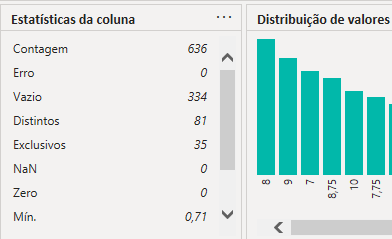
Is that possible export all column profile at the same time?
Or do something like that?
I have table with 68 columns and I want to have this data (not all columns, but some of them) to compare when I clean the database
Thank you in advance
Solved! Go to Solution.
Hi @t1agow
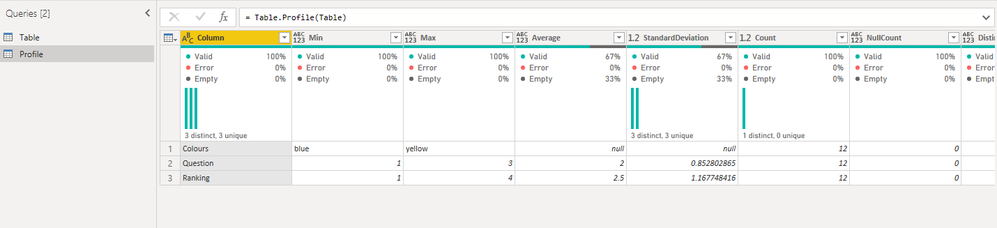
I think you can try Table.Profile() function to get data from column profile in Power Query.
For reference: Create a Profiling Report in Power BI: Give the End User Information about the Data
Best Regards,
Rico Zhou
If this post helps, then please consider Accept it as the solution to help the other members find it more quickly.
Hi @t1agow
I think you can try Table.Profile() function to get data from column profile in Power Query.
For reference: Create a Profiling Report in Power BI: Give the End User Information about the Data
Best Regards,
Rico Zhou
If this post helps, then please consider Accept it as the solution to help the other members find it more quickly.
@t1agow Not aware of any way to do that.
The Power BI Data Visualization World Championships is back! Get ahead of the game and start preparing now!
| User | Count |
|---|---|
| 40 | |
| 36 | |
| 34 | |
| 31 | |
| 27 |
| User | Count |
|---|---|
| 136 | |
| 103 | |
| 67 | |
| 65 | |
| 56 |