cancel
Showing results for 
Search instead for 
Did you mean: 

July 7 - July 17 | Round 2 of the Power BI Dataviz World Championships. Don't miss your chance! Learn more

Reply
Georgia_H
Helper I
Helper I

Export data - Incomplete records

Hi, i need help here. I have a table with 3121 records. When i exported into .csv, only 1698 records were exported.

I have seen other people posting the same issue, but no solution thus far. Is this a bug? Please help 😞

1 ACCEPTED SOLUTION

Hi @Georgia_H ,


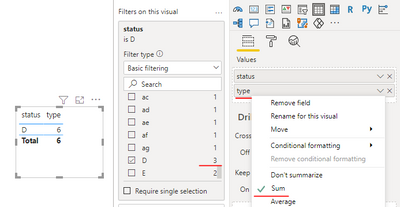
In the filter, we see that the D status has 3 rows of data, but only one row of data is displayed in the visual after aggregation.


vkkfmsft_0-1627018119991.png


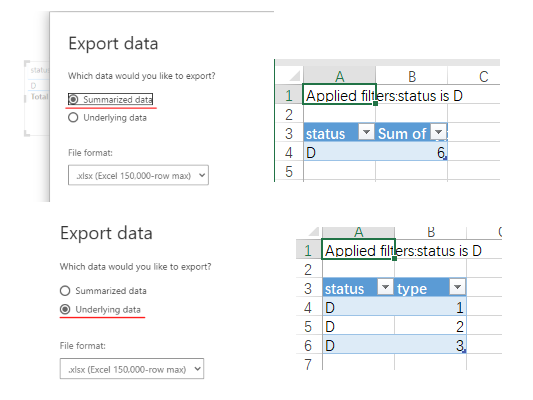
In this case, if we choose to export the summarized data, there will be only 1 row. If we choose the underlying data, the 3 rows of data that are not aggregated will be exported. So you need to choose the type of data exported to "Summarized data and Underlying data".


vkkfmsft_1-1627018444119.png


If the problem is still not resolved, please provide detailed error information or the expected result you expect. Let me know immediately, looking forward to your reply.

Best Regards,
Winniz

If this post helps, then please consider Accept it as the solution to help the other members find it more quickly.


View solution in original post

5 REPLIES 5
Anonymous
Not applicable

I am facing the same issue, Not able to export the total records. Is there any possible solution? Can we use DAX studio as external tool and export all the records?

Georgia_H
Helper I
Helper I

Thanks Winniz for the kind reply. Yes, now I managed to export the records fully. Once again, many thanks for your help and advice. Cheers

amitchandak
Super User
Super User

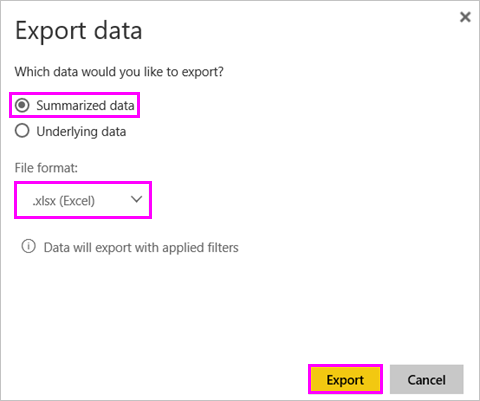
@Georgia_H , Is the visual table has that may row? because the visual table always group data. And ideally, that should get exported. But if you are looking for raw data that you can do from power bi service if this option is enabled


power-bi-export-data5

Share with Power BI Enthusiasts: Full Power BI Video (20 Hours) YouTube
Microsoft Fabric Series 60+ Videos YouTube
Microsoft Fabric Hindi End to End YouTube

Hi Amitchandak,

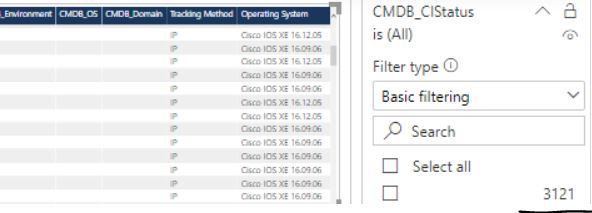
Thanks for the reply. As you can see, it's showing 3121 records. However when i exported out, it became 1698 instead. I dont know where went wrong. Yes, i exported from Power BI Service and Desktop also giving the same problem. Please advise.


Capture.JPG

Hi @Georgia_H ,


In the filter, we see that the D status has 3 rows of data, but only one row of data is displayed in the visual after aggregation.


vkkfmsft_0-1627018119991.png


In this case, if we choose to export the summarized data, there will be only 1 row. If we choose the underlying data, the 3 rows of data that are not aggregated will be exported. So you need to choose the type of data exported to "Summarized data and Underlying data".


vkkfmsft_1-1627018444119.png


If the problem is still not resolved, please provide detailed error information or the expected result you expect. Let me know immediately, looking forward to your reply.

Best Regards,
Winniz

If this post helps, then please consider Accept it as the solution to help the other members find it more quickly.


Helpful resources

Announcements
FabCon and SQLCon Barcelona 2026

FabCon & SQLCon – Barcelona 2026

Join us in Barcelona for FabCon and SQLCon, the Fabric, Power BI, SQL, and AI community event. Save €200 with code FABCMTY200.

60 days of Data Days Carousel

Data Days 2026

Join Fabric Data Days 2026: 60 days of free live/on-demand sessions, challenges, study groups, and certification opportunities.

Power BI DataViz World Championships carousel

Power BI DataViz World Championships - June 2026

A new Power BI DataViz World Championship is coming this June! Don't miss out on submitting your entry.