cancel
Showing results for 
Search instead for 
Did you mean: 

Get Fabric Certified for FREE during Fabric Data Days. Don't miss your chance! Request now

Reply
Anonymous
Not applicable

Export Matrix with Values in Rows

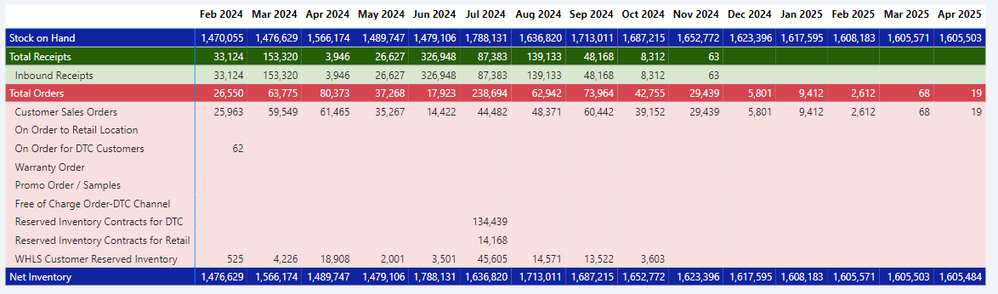
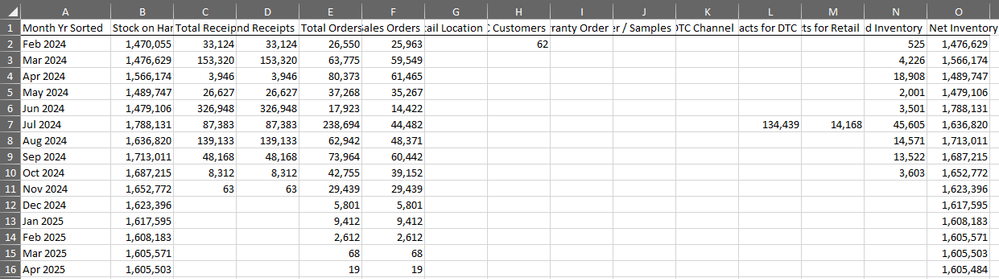
I have a matrix in a Power BI report, shown below, where values are in rows and months are in columns. I want this to export to Excel in the Exact same format, with values on rows and months on columns. However, when I export to .xlsx, either Data with Current Layout or Summarized data, the Excel report is produced with values on columns and months on rows (see second screenshot below). How can this be adjusted so I can export the file with values on rows? Thank you


marksaba_1-1708639654461.png


marksaba_0-1708639630498.png


4 REPLIES 4
alono23
New Member

@Anonymous did you find any solution to that problem?

lbendlin
Super User
Super User

You can correct this by not exporting.  Instead, use Analyze in Excel or "Excel with Live Connection"  and then recreate the desired format in Excel.

Anonymous
Not applicable

Thank you for the reply. This is a report a bunch of business users will be referencing, so I'd rather not have them need to reformat. Do you know of another matrix visual that allows for formatted exports?

Consider using Paginated Reports.  Fair warning: steep learning curve.

Helpful resources

Announcements
November Power BI Update Carousel

Power BI Monthly Update - November 2025

Check out the November 2025 Power BI update to learn about new features.

Fabric Data Days Carousel

Fabric Data Days

Advance your Data & AI career with 50 days of live learning, contests, hands-on challenges, study groups & certifications and more!

FabCon Atlanta 2026 carousel

FabCon Atlanta 2026

Join us at FabCon Atlanta, March 16-20, for the ultimate Fabric, Power BI, AI and SQL community-led event. Save $200 with code FABCOMM.

Top Solution Authors
Top Kudoed Authors