Join us at FabCon Atlanta from March 16 - 20, 2026, for the ultimate Fabric, Power BI, AI and SQL community-led event. Save $200 with code FABCOMM.
Register now!The Power BI Data Visualization World Championships is back! Get ahead of the game and start preparing now! Learn more
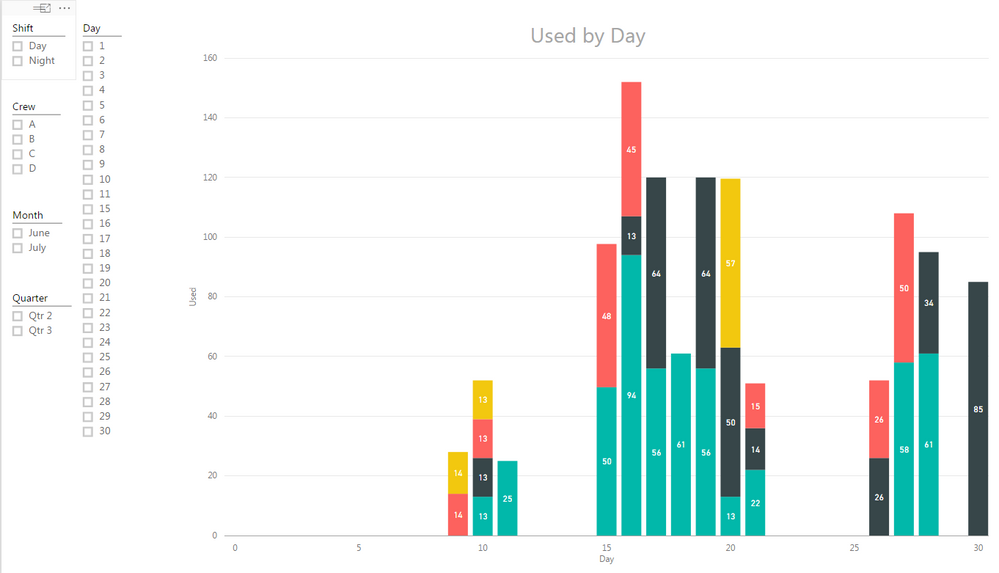
My data is a running data set, meaning I started tracking on June 15th. I understand that I can use the Slicer function to break the data into months, is there a way to see the data set in its entirity, right now it looks like it is limited to 30 days.
Thanks for the help!
CincyKidd
Solved! Go to Solution.
The solution is to go into the "Date" field, dropdown and tick the "Date" vs "Date Hierachy".
Based on the information provided you have started tracking from June 15. And as on date we are at July 15. The day column i presume refers to the day portion (DD) of the date column. June has only upto 30 days and July is not yet complete. Once you have the data until end july 31st, you will see the day 31 appearing.
When you say you want to see the data in entirety , can you share some more details on how you want the data to shown. By Month or by Day etc.
Cheers
CheenuSing
CheenuSing-
Thanks for the reply!
I would like to see all data, meaning from June 15 through today (whatever that will be. I can't figure out how to get that done!
Thanks again.
CincyKidd
I would like the x axis to display all data points, say 6/15-7-19. It currently shows only 30 days, non concurrent, meaning June or July or a combination of June and July, but only 30 days at a time..
Thanks.
CincyKidd
Ok. I clearly have confused everyone here, since there are no solutions, which I find hard to believe.
My revised summary.
I have been collecting data from 4 machines and sometimes a machine will have up to 4 data points on a day, I have been collecting this data since 6/15 and I would like to see all the data points in a bar graph along the X axis. I have been helped to figure out how to show the mulitiple data points, now I just need to figure out how to display ALL the data. Right now I get only 30 or 31 day chuncks.
Thanks for the help!
CincyKidd
The solution is to go into the "Date" field, dropdown and tick the "Date" vs "Date Hierachy".
Check out the November 2025 Power BI update to learn about new features.
Advance your Data & AI career with 50 days of live learning, contests, hands-on challenges, study groups & certifications and more!
| User | Count |
|---|---|
| 57 | |
| 44 | |
| 41 | |
| 21 | |
| 18 |
| User | Count |
|---|---|
| 183 | |
| 114 | |
| 93 | |
| 61 | |
| 45 |