
Don't miss your chance to take exam DP-600 or DP-700 on us!
Request nowLearn from the best! Meet the four finalists headed to the FINALS of the Power BI Dataviz World Championships! Register now
I have bring data to PowerBI through an REST API Endpoint. I have two questions:
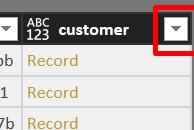
1) How do I expand the customer column so I get the value only (there are two column the customer records link/values) (Picture 1)
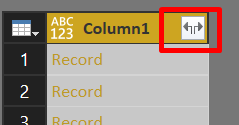
2) Why do I see 'expand' icon (two arrow) in some columns which allow me to pick the column and not in other column e.g. customer (Picture 2)
Solved! Go to Solution.
@smerchant,
The column with two arrow contains all the fields recorded in your JSON file, and some fields(e.g. customer ) contain nested arrays, these fields only have one arrow after you import data from JSON to Power BI Desktop.
To expand the customer column, please follow hugoberry's suggestions in this similar thread.
Regards,
Lydia Zhang
@smerchant,
The column with two arrow contains all the fields recorded in your JSON file, and some fields(e.g. customer ) contain nested arrays, these fields only have one arrow after you import data from JSON to Power BI Desktop.
To expand the customer column, please follow hugoberry's suggestions in this similar thread.
Regards,
Lydia Zhang
Hello,
Taking this further, I have 20 JSON files with 20 columns each to import. Rather than click, click, click, what is the programmatic method for importing these?
Specifically:
This is all manual at the moment.
Thank you!
Share feedback directly with Fabric product managers, participate in targeted research studies and influence the Fabric roadmap.
Check out the February 2026 Power BI update to learn about new features.
| User | Count |
|---|---|
| 51 | |
| 40 | |
| 37 | |
| 14 | |
| 14 |
| User | Count |
|---|---|
| 84 | |
| 71 | |
| 38 | |
| 29 | |
| 27 |