Get certified for free when you join Fabric Data Days 2026 and dive into Fabric, Power BI, SQL, AI, and other essential data skills.
Join nowJuly 7 - July 17 | Round 2 of the Power BI Dataviz World Championships. Don't miss your chance! Learn more
Hello,
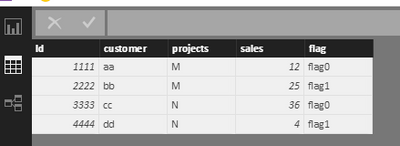
We are trying to reproduce the following scenario with no sucess:
Thank you in advance and regards,
Adri.
Solved! Go to Solution.
Hi @asaemart,
I try to reproduce your scenario by my sample table below.
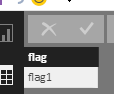
I create a new table including flag1 by clicking "New Table" under Modeling on Home page.
Create two measures using the following formula.
ISSELECTED = IF(ISFILTERED(Table3[flag]), VALUES(Table3[flag]),BLANK()) Sales-new = IF(ISBLANK(Table3[ISSELECTED]),CALCULATE(SUM(Table2[sales]),FILTER(Table2,Table2[flag]="flag0")),CALCULATE(SUM(Table2[sales]),FILTER(Table2,Table2[flag]="flag1")))
Create a slicer including flag1, create a table visual shows the information, set the visual filter as the highlighted red line.
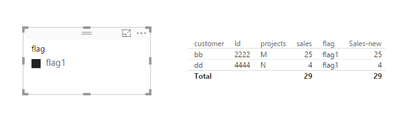
Please see the expected result. I shows the flag in table visual, so that you can see it directly. When we not select "flag1" it display all information for "flag0", otherwise, we select "flag0" it display all information for "flag1".
Please download the attachments to test.
Thanks,
Angelia
Hi @asaemart,
I try to reproduce your scenario by my sample table below.
I create a new table including flag1 by clicking "New Table" under Modeling on Home page.
Create two measures using the following formula.
ISSELECTED = IF(ISFILTERED(Table3[flag]), VALUES(Table3[flag]),BLANK()) Sales-new = IF(ISBLANK(Table3[ISSELECTED]),CALCULATE(SUM(Table2[sales]),FILTER(Table2,Table2[flag]="flag0")),CALCULATE(SUM(Table2[sales]),FILTER(Table2,Table2[flag]="flag1")))
Create a slicer including flag1, create a table visual shows the information, set the visual filter as the highlighted red line.
Please see the expected result. I shows the flag in table visual, so that you can see it directly. When we not select "flag1" it display all information for "flag0", otherwise, we select "flag0" it display all information for "flag1".
Please download the attachments to test.
Thanks,
Angelia
Join us in Barcelona for FabCon and SQLCon, the Fabric, Power BI, SQL, and AI community event. Save €200 with code FABCMTY200.
Join Fabric Data Days 2026: 60 days of free live/on-demand sessions, challenges, study groups, and certification opportunities.
| User | Count |
|---|---|
| 22 | |
| 20 | |
| 14 | |
| 13 | |
| 13 |
| User | Count |
|---|---|
| 63 | |
| 41 | |
| 40 | |
| 39 | |
| 38 |