Join us at FabCon Atlanta from March 16 - 20, 2026, for the ultimate Fabric, Power BI, AI and SQL community-led event. Save $200 with code FABCOMM.
Register now!The Power BI Data Visualization World Championships is back! Get ahead of the game and start preparing now! Learn more
Hello guys,
I have two tables "Suppliers" and "Not Active Supplier".
I have a calculated function with which I evaluate suppliers from my "Suppliers" table to arrive at a count. However, I would like to evaluate those suppliers, excluding those in the "not Active Supplier" table, but I do not know how to include the EXCEPT function in my formula as I've been getting errors. Here's the calculated measure I used (without excluding "Not Active Suppliers")
Active Suppliers =
CALCULATE (
DISTINCTCOUNT ( [Suppliers.Supplier ID] ),
contract_terminated[Terminated] = "Yes",
LEFT ( contract_terminated[Reason], 3 ) <> "Yes"
)
I'm new to DAX and any help would be appreciated. Thanks!
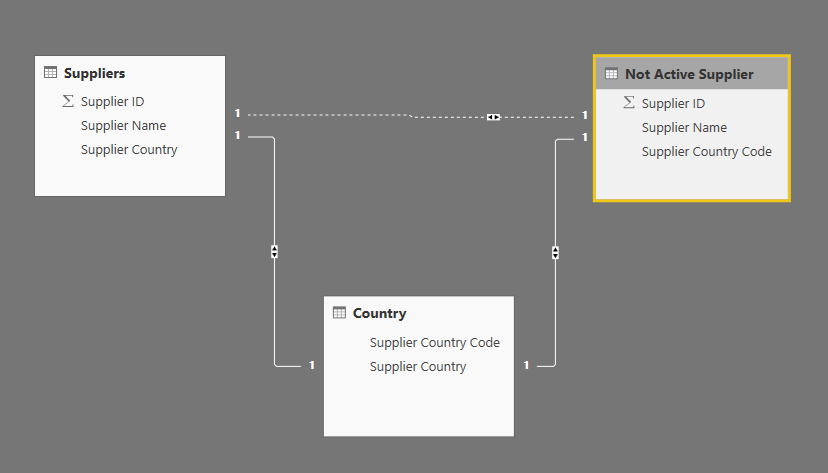
Here is what the data model looks like:
Data Model
Hi guys,
Thanks for you help, unfortunately I couldn't make them work with my model. I has to manually filter the visuals with the Supplier ID as it seems to work for the time being.
Best regards,
Hi @Anonymous ,
Do you try the ways that Ashish_Mathur and Vvelarde suggests? If they are helpful, please accept them as solutions. Welcome to share your own solutions. Others who have the same request will benefit from this thread.
If you have other questions, please feel free to ask us.
Best Regards,
Xue Ding
If this post helps, then please consider Accept it as the solution to help the other members find it more quickly.
Hi,
Here's one way.
=CALCULATE(DISTINCTCOUNT(Suppliers[Supplier ID]),Suppliers[Inactive suppliers]=BLANK())
Hope this helps.
@Anonymous
Try with this:
CALCULATE (
DISTINCTCOUNT ( [Suppliers.Supplier ID] ),Filter (EXCEPT(Suppliers, Not Active Suppliers),
contract_terminated[Terminated] = "Yes",
LEFT ( contract_terminated[Reason], 3 ) <> "Yes"
)Regards
Victor
The Power BI Data Visualization World Championships is back! Get ahead of the game and start preparing now!
| User | Count |
|---|---|
| 40 | |
| 35 | |
| 34 | |
| 31 | |
| 27 |
| User | Count |
|---|---|
| 135 | |
| 102 | |
| 67 | |
| 65 | |
| 56 |