cancel
Showing results for 
Search instead for 
Did you mean: 

We've captured the moments from FabCon & SQLCon that everyone is talking about, and we are bringing them to the community, live and on-demand. Starts on April 14th. Register now

Reply
Anonymous
Not applicable

Except Function Error

Hello guys,


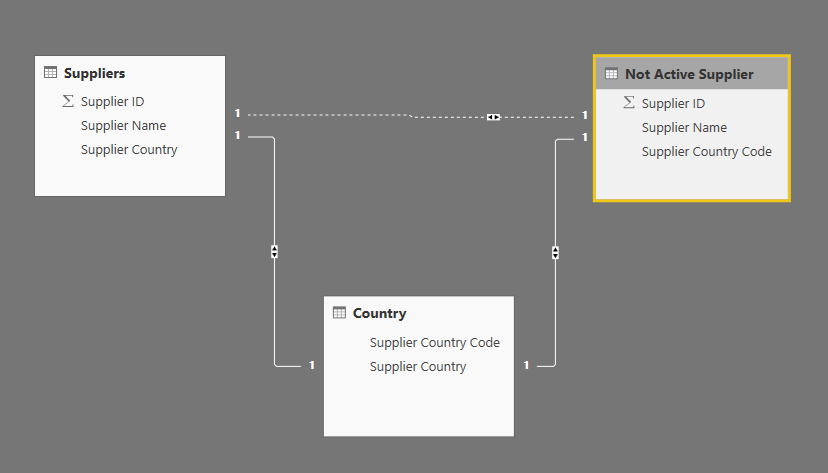
I have two tables "Suppliers" and "Not Active Supplier".

I have a calculated function with which I evaluate suppliers from my "Suppliers" table to arrive at a count. However, I would like to evaluate those suppliers, excluding those in the "not Active Supplier" table, but I do not know how to include the EXCEPT function in my formula as I've been getting errors. Here's the calculated measure I used (without excluding "Not Active Suppliers")


Active Suppliers =
CALCULATE (
DISTINCTCOUNT ( [Suppliers.Supplier ID] ),
contract_terminated[Terminated] = "Yes",
LEFT ( contract_terminated[Reason], 3 ) <> "Yes"
)


I'm new to DAX and any help would be appreciated. Thanks!    

Here is what the data model looks like:

Data ModelData Model

4 REPLIES 4
Anonymous
Not applicable

Hi guys,

Thanks for you help, unfortunately I couldn't make them work with my model. I has to manually filter the visuals with the Supplier ID as it seems to work for the time being.


Best regards,

v-xuding-msft
Community Support
Community Support

Hi @Anonymous ,

Do you try the ways that Ashish_Mathur and Vvelarde suggests? If they are helpful, please accept them as solutions. Welcome to share your own solutions. Others who have the same request will benefit from this thread.

If you have other questions, please feel free to ask us.


Best Regards,

Xue Ding

If this post helps, then please consider Accept it as the solution to help the other members find it more quickly.

Best Regards,
Xue Ding
If this post helps, then please consider Accept it as the solution to help the other members find it more quickly.
Ashish_Mathur
Super User
Super User

Hi,

Here's one way.

  1. Remove the inactive relationship between "Suppliers" and "Not Active suppliers" tables
  2. Using the Query Editor, bring over the Supplier ID column from the Not Active suppliers" table to the "Supplier" table.  Name this column as Inactive suppliers
  3. Write this DAX measure

=CALCULATE(DISTINCTCOUNT(Suppliers[Supplier ID]),Suppliers[Inactive suppliers]=BLANK())

Hope this helps.


Regards,
Ashish Mathur
http://www.ashishmathur.com
https://www.linkedin.com/in/excelenthusiasts/
Vvelarde
Community Champion
Community Champion

@Anonymous 

Try with this:


CALCULATE (
DISTINCTCOUNT ( [Suppliers.Supplier ID] ),Filter (EXCEPT(Suppliers, Not Active Suppliers),
contract_terminated[Terminated] = "Yes",
LEFT ( contract_terminated[Reason], 3 ) <> "Yes"
)

 Regards


Victor


Lima - Peru

Helpful resources

Announcements
New to Fabric survey Carousel

New to Fabric Survey

If you have recently started exploring Fabric, we'd love to hear how it's going. Your feedback can help with product improvements.

Power BI DataViz World Championships carousel

Power BI DataViz World Championships - June 2026

A new Power BI DataViz World Championship is coming this June! Don't miss out on submitting your entry.

Join our Fabric User Panel

Join our Fabric User Panel

Share feedback directly with Fabric product managers, participate in targeted research studies and influence the Fabric roadmap.

March Power BI Update Carousel

Power BI Community Update - March 2026

Check out the March 2026 Power BI update to learn about new features.