Join us at FabCon Atlanta from March 16 - 20, 2026, for the ultimate Fabric, Power BI, AI and SQL community-led event. Save $200 with code FABCOMM.
Register now!The Power BI Data Visualization World Championships is back! It's time to submit your entry. Live now!
Hi all
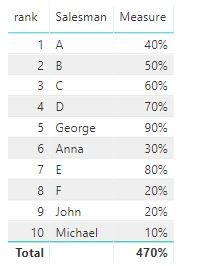
i have a graph calculated with a measure like this
Salesman Measure Needed dax expression (divide Measure to previous)
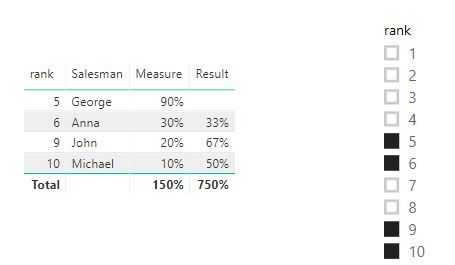
George 90% blank
Anna 30% 33% (divide 30%/90%)
John 20% 66% (divide 20%/30%)
Michael 10% 50% (divide 10%/20%)
The Salesmen have associated a rank behing and are sorted after it; but not all salesmen are selected so the rank is not consecutive
George 5
Anna 6
John 9
Michael 10
Thanks,
Cosmin
Solved! Go to Solution.
HI, @cosminc
Just try this formula to create a measure
Result = VAR _LASTRANK=CALCULATE(MAX('Table'[rank]),FILTER(ALLSELECTED('Table'),'Table'[rank]<MAX('Table'[rank])) ) RETURN
DIVIDE([Measure],CALCULATE([Measure],FILTER(ALLSELECTED('Table'),'Table'[rank]=_LASTRANK)))
Result:
here is pbix file, please try it.
Best Regards,
Lin
HI, @cosminc
Just try this formula to create a measure
Result = VAR _LASTRANK=CALCULATE(MAX('Table'[rank]),FILTER(ALLSELECTED('Table'),'Table'[rank]<MAX('Table'[rank])) ) RETURN
DIVIDE([Measure],CALCULATE([Measure],FILTER(ALLSELECTED('Table'),'Table'[rank]=_LASTRANK)))
Result:
here is pbix file, please try it.
Best Regards,
Lin
it works perfect!
Thanks!
Cosmin
in your Rank function use ALLSELECTED instead of ALL
Hi,
Rank used is not a function, is in source
Thanks,
Cosmin
Possible to upload some sample data?
it's a huge base
please try to upload the direct example from the top
Thanks,
Cosmin
| User | Count |
|---|---|
| 51 | |
| 38 | |
| 33 | |
| 22 | |
| 19 |
| User | Count |
|---|---|
| 136 | |
| 102 | |
| 59 | |
| 36 | |
| 35 |