Join us at FabCon Atlanta from March 16 - 20, 2026, for the ultimate Fabric, Power BI, AI and SQL community-led event. Save $200 with code FABCOMM.
Register now!The Power BI Data Visualization World Championships is back! Get ahead of the game and start preparing now! Learn more
Hi all
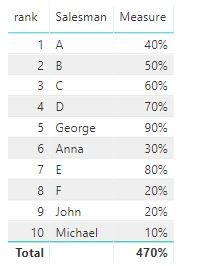
i have a graph calculated with a measure like this
Salesman Measure Needed dax expression (divide Measure to previous)
George 90% blank
Anna 30% 33% (divide 30%/90%)
John 20% 66% (divide 20%/30%)
Michael 10% 50% (divide 10%/20%)
The Salesmen have associated a rank behing and are sorted after it; but not all salesmen are selected so the rank is not consecutive
George 5
Anna 6
John 9
Michael 10
Thanks,
Cosmin
Solved! Go to Solution.
HI, @cosminc
Just try this formula to create a measure
Result = VAR _LASTRANK=CALCULATE(MAX('Table'[rank]),FILTER(ALLSELECTED('Table'),'Table'[rank]<MAX('Table'[rank])) ) RETURN
DIVIDE([Measure],CALCULATE([Measure],FILTER(ALLSELECTED('Table'),'Table'[rank]=_LASTRANK)))
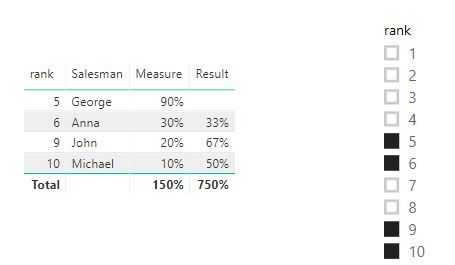
Result:
here is pbix file, please try it.
Best Regards,
Lin
HI, @cosminc
Just try this formula to create a measure
Result = VAR _LASTRANK=CALCULATE(MAX('Table'[rank]),FILTER(ALLSELECTED('Table'),'Table'[rank]<MAX('Table'[rank])) ) RETURN
DIVIDE([Measure],CALCULATE([Measure],FILTER(ALLSELECTED('Table'),'Table'[rank]=_LASTRANK)))
Result:
here is pbix file, please try it.
Best Regards,
Lin
it works perfect!
Thanks!
Cosmin
in your Rank function use ALLSELECTED instead of ALL
Hi,
Rank used is not a function, is in source
Thanks,
Cosmin
Possible to upload some sample data?
it's a huge base
please try to upload the direct example from the top
Thanks,
Cosmin
The Power BI Data Visualization World Championships is back! Get ahead of the game and start preparing now!
| User | Count |
|---|---|
| 39 | |
| 37 | |
| 33 | |
| 32 | |
| 29 |
| User | Count |
|---|---|
| 133 | |
| 88 | |
| 85 | |
| 68 | |
| 64 |