Don't miss your chance to take the Fabric Data Engineer (DP-600) exam for FREE! Find out how by attending the DP-600 session on April 23rd (pacific time), live or on-demand.
Learn moreNext up in the FabCon + SQLCon recap series: The roadmap for Microsoft SQL and Maximizing Developer experiences in Fabric. All sessions are available on-demand after the live show. Register now
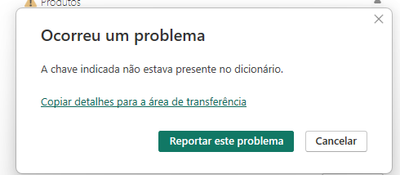
I'm updating my bi desktop and I get this error. Has it ever happened to anyone?
ERROR : "the indicated key was not present in the dictionary"
Solved! Go to Solution.
Hello @fpereira ,
go to power query and try to reresh each table and see where the error is coming from and see what it is.
Proud to be a Super User! | |
Hi @fpereira ,
Whether your problem has been resolved? If no, you can try the following steps:
1. Upgrade to the Latest Version: Ensure that your Power BI Desktop is running the most recent version. If not, update it to the latest release. Outdated versions may have bugs or compatibility issues that could trigger errors during refresh.
Download Power BI Desktop from Official Microsoft Download Center
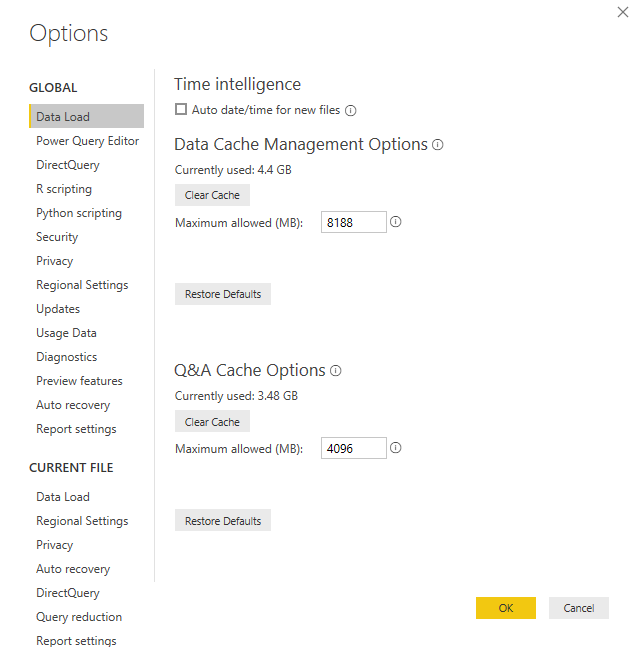
2. Clear Cache:Clearing the cache can sometimes resolve issues related to data refresh.
Solved: How to clear cache in Power BI Desktop - Microsoft Fabric Community
how-to-clear-cache-of-power-bi-desktop
Best Regards
Hi @fpereira ,
Whether your problem has been resolved? If yes, could you please mark the helpful post as Answered? It will help the others in the community find the solution easily if they face the same problem as yours. Thank you.
Best Regards
Hi @fpereira ,
Whether your problem has been resolved? If no, you can try the following steps:
1. Upgrade to the Latest Version: Ensure that your Power BI Desktop is running the most recent version. If not, update it to the latest release. Outdated versions may have bugs or compatibility issues that could trigger errors during refresh.
Download Power BI Desktop from Official Microsoft Download Center
2. Clear Cache:Clearing the cache can sometimes resolve issues related to data refresh.
Solved: How to clear cache in Power BI Desktop - Microsoft Fabric Community
how-to-clear-cache-of-power-bi-desktop
Best Regards
Hello @fpereira ,
go to power query and try to reresh each table and see where the error is coming from and see what it is.
Proud to be a Super User! | |
If you have recently started exploring Fabric, we'd love to hear how it's going. Your feedback can help with product improvements.
A new Power BI DataViz World Championship is coming this June! Don't miss out on submitting your entry.
Share feedback directly with Fabric product managers, participate in targeted research studies and influence the Fabric roadmap.
| User | Count |
|---|---|
| 48 | |
| 45 | |
| 41 | |
| 20 | |
| 17 |
| User | Count |
|---|---|
| 69 | |
| 64 | |
| 32 | |
| 31 | |
| 27 |