cancel
Showing results for 
Search instead for 
Did you mean: 

July 7 - July 17 | Round 2 of the Power BI Dataviz World Championships. Don't miss your chance! Learn more

Reply
fpereira
Regular Visitor

Error

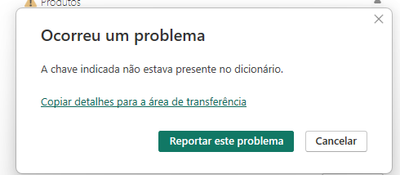
I'm updating my bi desktop and I get this error. Has it ever happened to anyone?


ERROR : "the indicated key was not present in the dictionary"

fpereira_0-1709150629621.png


2 ACCEPTED SOLUTIONS
Idrissshatila
Super User
Super User

Hello @fpereira ,


go to power query and try to reresh each table and see where the error is coming from and see what it is.


Did I answer your question? Mark my post as a solution! Appreciate your Kudos
Follow me on LinkedIn linkedIn
Vote for my Community Mobile App Idea

Proud to be a Super User!


View solution in original post

Anonymous
Not applicable

Hi @fpereira ,

Whether your problem has been resolved? If no, you can try the following steps:

1. Upgrade to the Latest Version: Ensure that your Power BI Desktop is running the most recent version. If not, update it to the latest release. Outdated versions may have bugs or compatibility issues that could trigger errors during refresh.

Download Power BI Desktop from Official Microsoft Download Center
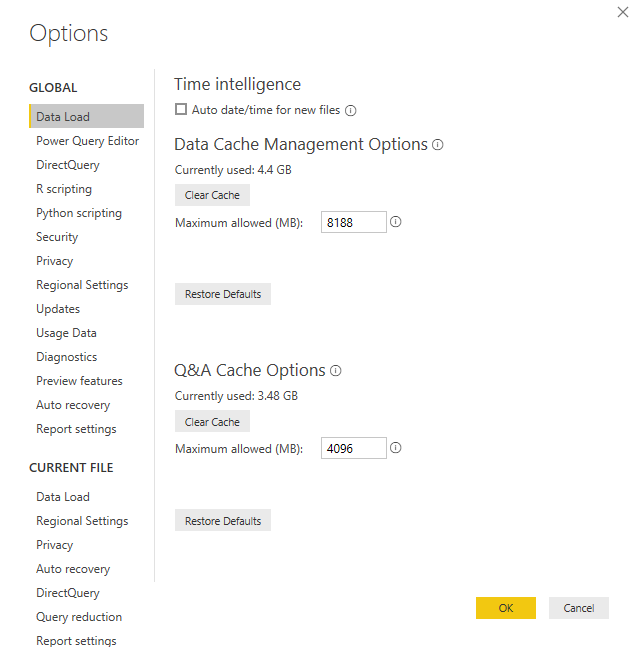
2. Clear Cache:Clearing the cache can sometimes resolve issues related to data refresh.
Solved: How to clear cache in Power BI Desktop - Microsoft Fabric Community

how-to-clear-cache-of-power-bi-desktop

vyiruanmsft_0-1709196992126.png

Best Regards

View solution in original post

4 REPLIES 4
FilipaPereira
Frequent Visitor

@Idrissshatila

 
Yes I managed to solve it with your help
Anonymous
Not applicable

Hi @fpereira ,

Whether your problem has been resolved? If yes, could you please mark the helpful post as Answered? It will help the others in the community find the solution easily if they face the same problem as yours. Thank you.

Best Regards

Anonymous
Not applicable

Hi @fpereira ,

Whether your problem has been resolved? If no, you can try the following steps:

1. Upgrade to the Latest Version: Ensure that your Power BI Desktop is running the most recent version. If not, update it to the latest release. Outdated versions may have bugs or compatibility issues that could trigger errors during refresh.

Download Power BI Desktop from Official Microsoft Download Center
2. Clear Cache:Clearing the cache can sometimes resolve issues related to data refresh.
Solved: How to clear cache in Power BI Desktop - Microsoft Fabric Community

how-to-clear-cache-of-power-bi-desktop

vyiruanmsft_0-1709196992126.png

Best Regards

Idrissshatila
Super User
Super User

Hello @fpereira ,


go to power query and try to reresh each table and see where the error is coming from and see what it is.


Did I answer your question? Mark my post as a solution! Appreciate your Kudos
Follow me on LinkedIn linkedIn
Vote for my Community Mobile App Idea

Proud to be a Super User!


Helpful resources

Announcements
FabCon and SQLCon Barcelona 2026

FabCon & SQLCon – Barcelona 2026

Join us in Barcelona for FabCon and SQLCon, the Fabric, Power BI, SQL, and AI community event. Save €200 with code FABCMTY200.

60 days of Data Days Carousel

Data Days 2026

Join Data Days 2026: 60 days of free live/on-demand sessions, challenges, study groups, and certification opportunities.

Power BI DataViz World Championships carousel

Power BI DataViz World Championships - June 2026

A new Power BI DataViz World Championship is coming this June! Don't miss out on submitting your entry.

Top Solution Authors