Don't miss your chance to take the Fabric Data Engineer (DP-600) exam for FREE! Find out how by watching the DP-600 session on-demand now through April 28th.
Learn moreJoin the FabCon + SQLCon recap series. Up next: Power BI, Real-Time Intelligence, IQ and AI, and Data Factory take center stage. All sessions are available on-demand after the live show. Register now
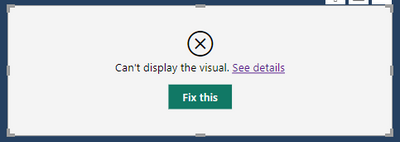
Hi, I have a problem in applying a Flow Map whereby when I add a destination field from my table, the vusial turns from a map to this:
When I remove the Destination field, the map displays normal again.
Would anyone have any ideas why this might be occurring? It has me completely stumped. Thanks.
Solved! Go to Solution.
Hi Pratyashasamal,
you wouldn't believe the problem (it's now solved). The PBI file I was working on was a copy of another file, as in copy-paste. I did this in case I made any errors while modifying the file. As it turns out, never do this (copy-paste a PBI file). If you do this, the copied file causes conflicts when making changes. Some how the two files remain 'connnected' This is why the cpied files wasn't responding to the new data I'd added.
Instead, I took the original file, 'Saved As', and renamed the new file. Upon wokring on it, the issue no longer exists. The new file is repsonding fine now with no conflicts. The Flow is working properly.
Many thanks for your response.
Hello,
There might be some reason which is causing those errors please check below,
The data type of the new field you are adding to the destination field is compatible with the existing fields in the visualization.
Please check if there are any null or blank values in the new field you are adding.
make sure that there are no typos or missing values in the new field.
The settings of the Flow Map visualization should be set correctly.
Make sure that the version of Power BI you are using is up-to-date.
Thanks,
Hi @1001 ,
Please let me know which version of flow map are you using and please share the details for the error that you are getting .
Please refer to this link :-
https://weiweicui.github.io/PowerBI-Flowmap/
Thanks,
Pratyasha Samal
Has this post solved your problem? Please Accept as Solution so that others can find it quickly and to let the community know your problem has been solved.
If you found this post helpful, please give Kudos C
Proud to be a Super User!
Hi Pratyashasamal,
you wouldn't believe the problem (it's now solved). The PBI file I was working on was a copy of another file, as in copy-paste. I did this in case I made any errors while modifying the file. As it turns out, never do this (copy-paste a PBI file). If you do this, the copied file causes conflicts when making changes. Some how the two files remain 'connnected' This is why the cpied files wasn't responding to the new data I'd added.
Instead, I took the original file, 'Saved As', and renamed the new file. Upon wokring on it, the issue no longer exists. The new file is repsonding fine now with no conflicts. The Flow is working properly.
Many thanks for your response.
Check out the April 2026 Power BI update to learn about new features.
If you have recently started exploring Fabric, we'd love to hear how it's going. Your feedback can help with product improvements.
A new Power BI DataViz World Championship is coming this June! Don't miss out on submitting your entry.
| User | Count |
|---|---|
| 41 | |
| 37 | |
| 34 | |
| 21 | |
| 16 |
| User | Count |
|---|---|
| 66 | |
| 58 | |
| 31 | |
| 25 | |
| 24 |