Get certified for free when you join Fabric Data Days 2026 and dive into Fabric, Power BI, SQL, AI, and other essential data skills.
Join nowJuly 7 - July 17 | Round 2 of the Power BI Dataviz World Championships. Don't miss your chance! Learn more
Dear community,
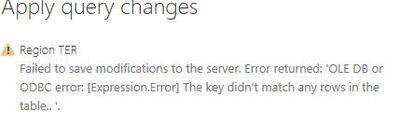
I am getting the below error while loading apply the query to the newly loaded file.
how do i fix this?
Solved! Go to Solution.
i figured it out, its because of the change in the sheet name in 2nd file.
its strange that Power BI is not pushing this
i figured it out, its because of the change in the sheet name in 2nd file.
its strange that Power BI is not pushing this
@vjnvinod,
Would you mind sharing the Folder through Private Message? I will test it in my Desktop.
Regards,
Lydia
@Anonymous
i am connected to a folder, where i have 3 excel
i have used edit option to combine that 3 excel together, after combining when i am applying the changes
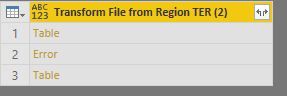
i am getting this error, i checked the step and noticed that row 2 is coming as error(See below)
[Expression.Error] The key didn't match any rows in the table
@vjnvinod,
What is your data source? Please go to Power BI Desktop query editor to check the APPLIED STEPS and check if which step throws this error.
In addition, please go to Advanced Editor of your current query in Query Editor, then check if the file path is correct.
Regards,
Lydia
Join us in Barcelona for FabCon and SQLCon, the Fabric, Power BI, SQL, and AI community event. Save €200 with code FABCMTY200.
Join Data Days 2026: 60 days of free live/on-demand sessions, challenges, study groups, and certification opportunities.
| User | Count |
|---|---|
| 29 | |
| 23 | |
| 18 | |
| 18 | |
| 15 |
| User | Count |
|---|---|
| 51 | |
| 44 | |
| 43 | |
| 39 | |
| 33 |