Join us at FabCon Atlanta from March 16 - 20, 2026, for the ultimate Fabric, Power BI, AI and SQL community-led event. Save $200 with code FABCOMM.
Register now!The Power BI Data Visualization World Championships is back! Get ahead of the game and start preparing now! Learn more
I have a dataset coming from an SQL server in PowerBI. The dataset is currently 21,000+ rows. There is a column that has a Unix timestamp which I am trying to convert to regular timestamp. I am using the below formula:
#datetime(1970, 1, 1, 0, 0, 0) + #duration(0, 0, 0, [value])
When typing in the formula, BI does not show any error with the formula, however, when executed the following error message comes up:
"Expression.Error: The Duration operation failed because the resulting duration falls outside the range of allowed values."
How can I either expand the range or use a different formula that will not result in an error message?
Solved! Go to Solution.
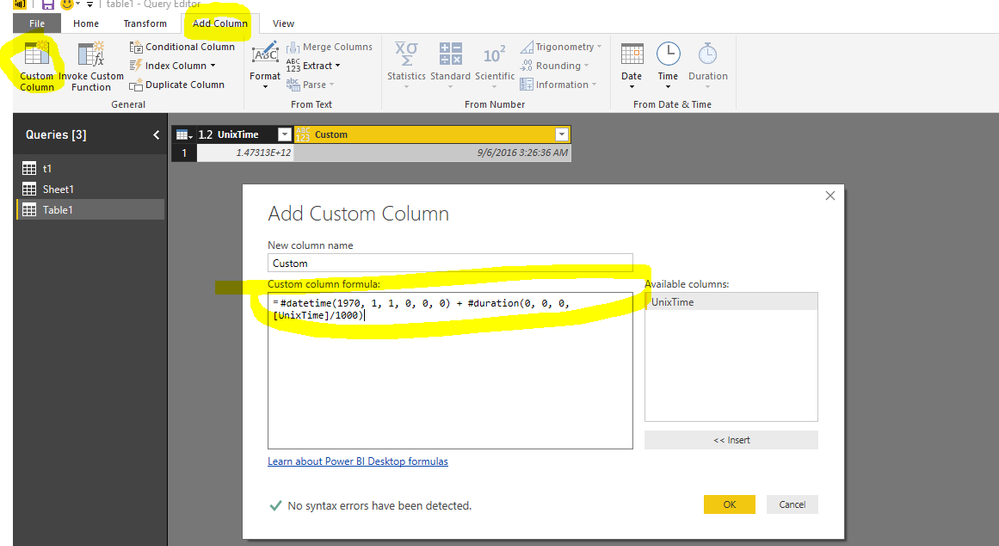
You can add a custom column
#datetime(1970, 1, 1, 0, 0, 0) + #duration(0, 0, 0, [UnixTime]/1000)
Regards,
Charlie Liao
You can add a custom column
#datetime(1970, 1, 1, 0, 0, 0) + #duration(0, 0, 0, [UnixTime]/1000)
Regards,
Charlie Liao
Thanks a lot.
Yes, that works. Thank you!!
The Power BI Data Visualization World Championships is back! Get ahead of the game and start preparing now!
| User | Count |
|---|---|
| 38 | |
| 36 | |
| 33 | |
| 33 | |
| 29 |
| User | Count |
|---|---|
| 134 | |
| 96 | |
| 78 | |
| 67 | |
| 65 |