
cancel
Showing results for 
Search instead for 
Did you mean: 

Next up in the FabCon + SQLCon recap series: The roadmap for Microsoft SQL and Maximizing Developer experiences in Fabric. All sessions are available on-demand after the live show. Register now

Reply
ffirda99
Frequent Visitor

Error In Appended

Hi, 


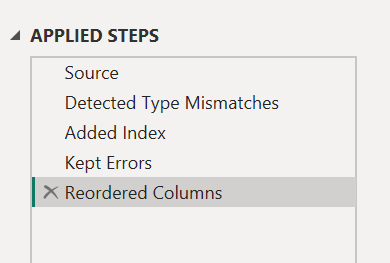
I struggle when I want to find out something wrong with my column in my Appended Table, there is no information on which columns are errors.

ffirda99_0-1711949146649.png

ffirda99_0-1711949364916.png


May I know, how to filter column which has error data? Thank you for helping!


1 ACCEPTED SOLUTION
MNedix
Solution Sage
Solution Sage

This article may be helpful - https://learn.microsoft.com/en-us/power-query/dealing-with-errors


If this solved your problem then please mark it as the solution so others can see it.


If the post helped then please give it a Kudos and mark it as the solution so others can see it.
Cheers,

View solution in original post

3 REPLIES 3
MNedix
Solution Sage
Solution Sage

This article may be helpful - https://learn.microsoft.com/en-us/power-query/dealing-with-errors


If this solved your problem then please mark it as the solution so others can see it.


If the post helped then please give it a Kudos and mark it as the solution so others can see it.
Cheers,
MNedix
Solution Sage
Solution Sage

Hi,

I think if you scroll to the right through the columns, the header of the Column(s) with errors will be in Red. It would also help to activate Column quality and Column distribution in the View section of Power Query.


If the post helped then please give it a Kudos and mark it as the solution so others can see it.
Cheers,

Hi, @MNedix 


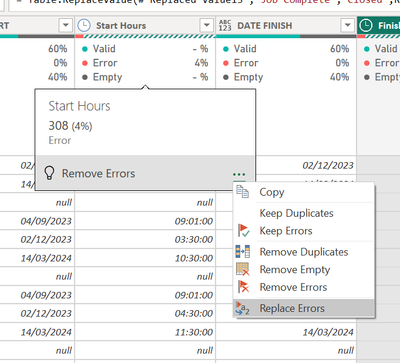
I used column quality & distribution, and I got an error column.

ffirda99_1-1711957815889.png


Now, I want to know how to show error detail? Or filter data error, how to do it? so I can fix the data.

Thank you

Helpful resources

Announcements
New to Fabric survey Carousel

New to Fabric Survey

If you have recently started exploring Fabric, we'd love to hear how it's going. Your feedback can help with product improvements.

Power BI DataViz World Championships carousel

Power BI DataViz World Championships - June 2026

A new Power BI DataViz World Championship is coming this June! Don't miss out on submitting your entry.

Join our Fabric User Panel

Join our Fabric User Panel

Share feedback directly with Fabric product managers, participate in targeted research studies and influence the Fabric roadmap.

March Power BI Update Carousel

Power BI Community Update - March 2026

Check out the March 2026 Power BI update to learn about new features.