
Get certified for free when you join Fabric Data Days 2026 and dive into Fabric, Power BI, SQL, AI, and other essential data skills.
Join nowData Days is here! Join us now for 60+ days of learning, challenges, and connection. Learn more
Hi,
I struggle when I want to find out something wrong with my column in my Appended Table, there is no information on which columns are errors.
May I know, how to filter column which has error data? Thank you for helping!
Solved! Go to Solution.
This article may be helpful - https://learn.microsoft.com/en-us/power-query/dealing-with-errors
If this solved your problem then please mark it as the solution so others can see it.
This article may be helpful - https://learn.microsoft.com/en-us/power-query/dealing-with-errors
If this solved your problem then please mark it as the solution so others can see it.
Hi,
I think if you scroll to the right through the columns, the header of the Column(s) with errors will be in Red. It would also help to activate Column quality and Column distribution in the View section of Power Query.
Hi, @MNedix
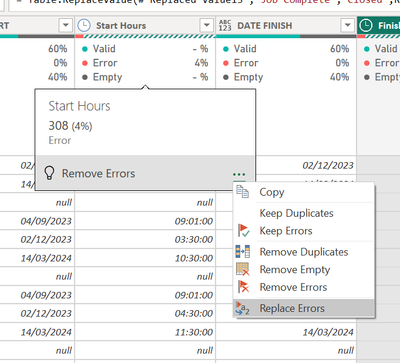
I used column quality & distribution, and I got an error column.
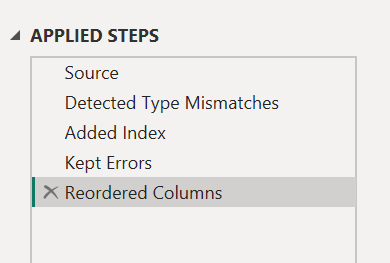
Now, I want to know how to show error detail? Or filter data error, how to do it? so I can fix the data.
Thank you
Don't miss out on Data Days, June 15 through August 7. Learn Fabric, Power BI, SQL, AI and more.
Check out the May 2026 Power BI update to learn about new features.
| User | Count |
|---|---|
| 23 | |
| 23 | |
| 21 | |
| 17 | |
| 13 |
| User | Count |
|---|---|
| 58 | |
| 50 | |
| 38 | |
| 29 | |
| 24 |