Get certified for free when you join Fabric Data Days 2026 and dive into Fabric, Power BI, SQL, AI, and other essential data skills.
Join nowData Days is here! Join us now for 60+ days of learning, challenges, and connection. Learn more
Using the July 2020 (x64, 2.83.5894.881) and earlier versions of PBI Desktop, I was able to enable R scripting visuals & have that setting saved within the .pbix file - allowing me to run scripts without interaction.
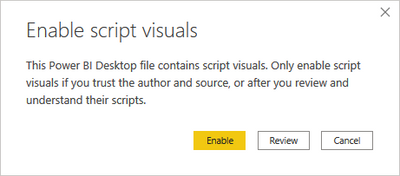
Subsequent versions of PBID have not saved the "Enable Script Visuals" setting, requiring me to interactively "Enable" scripting each time the file opens.
Suggestions?
I also have this issue. I have a number of R visuals based on scripts I wrote using the embedded R scripting ability. When I check them in R studio (my IDE) they work fine, and trhey all used to render perfectly on PBI desktop. Since very recently, they seem to be stuck in a loop where the "select to enable" pop-up simply keeps popping up preventing the visual from being shown - my visuals are now useless. I may open a fresh question for this.
Hi @Anonymous ,
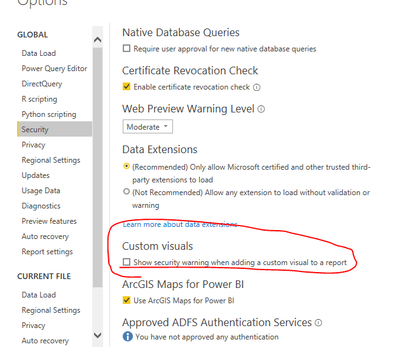
Try to turn this option off
options and settings->options->security.
Best Regards,
Liang
If this post helps, then please consider Accept it as the solution to help the other members find it more quickly.
No joy.
Changing this setting has no effect. For what it's worth, these are not custom visuals - I'm using the native "R Script Visual" that's included with PBI-D.
I am also having this issue. Were you ever able to find a solution?
Don't miss out on Data Days, June 15 through August 7. Learn Fabric, Power BI, SQL, AI and more.
Check out the May 2026 Power BI update to learn about new features.
| User | Count |
|---|---|
| 23 | |
| 21 | |
| 20 | |
| 18 | |
| 13 |
| User | Count |
|---|---|
| 58 | |
| 51 | |
| 38 | |
| 31 | |
| 26 |