cancel
Showing results for 
Search instead for 
Did you mean: 

July 7 - July 17 | Round 2 of the Power BI Dataviz World Championships. Don't miss your chance! Learn more

Reply
Anonymous
Not applicable

Empty Visualizations

Hi All, 


I am attempting to create KPI power bi report for multiple customers. I have few visualizations that might not be applicable for certain customers (i.e raised tickets by VIP users) 


How can I show a text or an image in this case instead of an empty place? 


Regards

4 REPLIES 4
amitchandak
Super User
Super User

@Anonymous ,The information you have provided is not making the problem clear to me. Can you please explain with an example.
see if bookmark can help

https://radacad.com/bookmarks-and-buttons-making-power-bi-charts-even-more-interactive
Appreciate your Kudos.

Share with Power BI Enthusiasts: Full Power BI Video (20 Hours) YouTube
Microsoft Fabric Series 60+ Videos YouTube
Microsoft Fabric Hindi End to End YouTube
Anonymous
Not applicable

Thank you both for your response. Apologies for not writing a clear description of my inquiry. @Pragati11 @amitchandak 


Background: My data source is my sql import. and this is a KPI that should be used for multiple accounts.


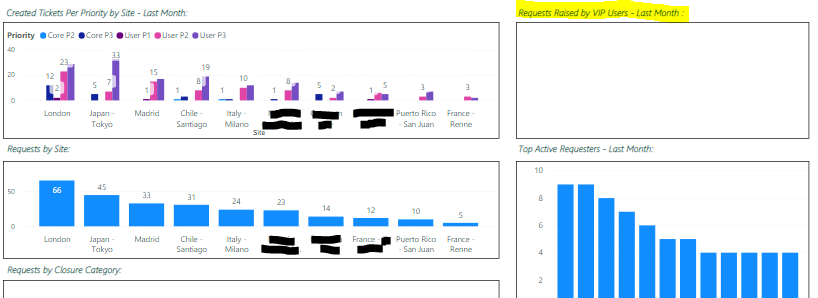
The filter I have on the highlighted visualization is to show a pie chart for all VIP users marked "True" and for this customer, They do not have users marked as VIP so it shows as it is empty. 


However, when I change the account name on "filter on all pages" the model works fine and shows data.


So my enquiry is: is there a way where I can have something replace this empty place that says "Not applicable for this customer" for instance? 


See the below snap from my report


Capture.PNG


HI @Anonymous ,


May be I still don't understand your issue.

But whatever value you are miving in your highlighted visual, that value doesn't exist for VIP's not marked TRUE in the data.

So, you will have to  create a IF-ELSE logic around the value that you are using in your highlighted visual, in order to replace Blanks with "Not applicable for this customer".


Can you tell what column/measure you are moving in your highlighted visual?


Thanks,

Pragati

Best Regards,

Pragati Jain


MVP logo


LinkedIn | Twitter | Blog YouTube 

Did I answer your question? Mark my post as a solution! This will help others on the forum!

Appreciate your Kudos!!

Proud to be a Super User!!

Pragati11
Super User
Super User

Hi @Anonymous ,


Can you share some screenshots around data and visualisations you are trying to use?


You can create a DAX using ISBALNK() in Power BI to replace your blank values with any other value like Image ot text within a IF-ELSE statement.

Refer following article on this:

https://radacad.com/replace-blank-with-zero-in-power-bi-visuals-such-as-card


If this helps and resolves the issue, appreciate a Kudos and mark it as a Solution! 🙂


Thanks,

Pragati

Best Regards,

Pragati Jain


MVP logo


LinkedIn | Twitter | Blog YouTube 

Did I answer your question? Mark my post as a solution! This will help others on the forum!

Appreciate your Kudos!!

Proud to be a Super User!!

Helpful resources

Announcements
FabCon and SQLCon Barcelona 2026

FabCon & SQLCon – Barcelona 2026

Join us in Barcelona for FabCon and SQLCon, the Fabric, Power BI, SQL, and AI community event. Save €200 with code FABCMTY200.

60 days of Data Days Carousel

Data Days 2026

Join Fabric Data Days 2026: 60 days of free live/on-demand sessions, challenges, study groups, and certification opportunities.

Power BI DataViz World Championships carousel

Power BI DataViz World Championships - June 2026

A new Power BI DataViz World Championship is coming this June! Don't miss out on submitting your entry.