
This time we’re going bigger than ever. Fabric, Power BI, SQL, AI and more. We're covering it all. You won't want to miss it.
Learn moreDid you hear? There's a new SQL AI Developer certification (DP-800). Start preparing now and be one of the first to get certified. Register now
I have a table which holds payment types. The types are only abbreviated in my model as C(cash) and D(debit order).
I want to change the data to actaully show Cash and Debit order. So that my visualisation holds the full description for users to understand.
Can this be achieved without having to change the data in the db? And how?
Solved! Go to Solution.
Hi @Anonymous ,
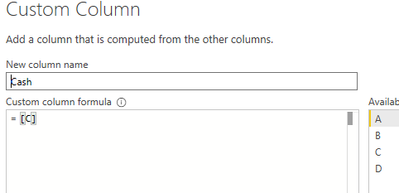
You can add two new custom cloumns in the query edit.
Then remove the "C" and "D" columns, click "Close & Apply".
This method will not change the data in the DB and will not affect the next refresh.
Hi @Anonymous ,
You can add two new custom cloumns in the query edit.
Then remove the "C" and "D" columns, click "Close & Apply".
This method will not change the data in the DB and will not affect the next refresh.
If you are allowed to change it in power query (this will not change on your database),
just hit replace values.
If you want in dax,
Add calculated column like
Description of Code =
if (column name) = ("your code"), ("new description"),
if (column name) = ("your code"), ("new description1"))
Then you can use your calculated column instead of the code.
Hi @Anonymous ,
if you don't want to modify your source table you can create a mapping table with two columns - first with abbreviation and second with full description.
Then you can create relationship between the two tables and use field containing full description in your dashboard.
Hope it helps!
Matej
Check out the April 2026 Power BI update to learn about new features.
Sign up to receive a private message when registration opens and key events begin.
If you have recently started exploring Fabric, we'd love to hear how it's going. Your feedback can help with product improvements.
| User | Count |
|---|---|
| 34 | |
| 31 | |
| 30 | |
| 21 | |
| 16 |
| User | Count |
|---|---|
| 63 | |
| 53 | |
| 31 | |
| 23 | |
| 23 |