Join us at FabCon Atlanta from March 16 - 20, 2026, for the ultimate Fabric, Power BI, AI and SQL community-led event. Save $200 with code FABCOMM.
Register now!The Power BI Data Visualization World Championships is back! Get ahead of the game and start preparing now! Learn more
Hi, I just wonder if there is any option to edit the Total name, as it is possible in a pivot chart. I just want to change the total Text to another text.
Thanks,
Clara Gonzalez Ginestet
Solved! Go to Solution.
Not aware of a default way of doing that. If the matrix will always be the same size, you could overlay it with a Text box with an opaque background.
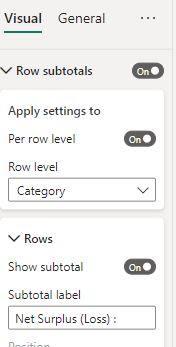
You can change this.
It is the Rows Subtotal label for that Row level (SubRegion)
@Anonymous,
There is already an idea, you may leave a comment and vote it up.
Not aware of a default way of doing that. If the matrix will always be the same size, you could overlay it with a Text box with an opaque background.
The Power BI Data Visualization World Championships is back! Get ahead of the game and start preparing now!
Check out the November 2025 Power BI update to learn about new features.
| User | Count |
|---|---|
| 59 | |
| 46 | |
| 42 | |
| 23 | |
| 17 |
| User | Count |
|---|---|
| 190 | |
| 122 | |
| 96 | |
| 66 | |
| 47 |