Join us at FabCon Atlanta from March 16 - 20, 2026, for the ultimate Fabric, Power BI, AI and SQL community-led event. Save $200 with code FABCOMM.
Register now!The Power BI Data Visualization World Championships is back! Get ahead of the game and start preparing now! Learn more
Hi, I just wonder if there is any option to edit the Total name, as it is possible in a pivot chart. I just want to change the total Text to another text.
Thanks,
Clara Gonzalez Ginestet
Solved! Go to Solution.
Not aware of a default way of doing that. If the matrix will always be the same size, you could overlay it with a Text box with an opaque background.
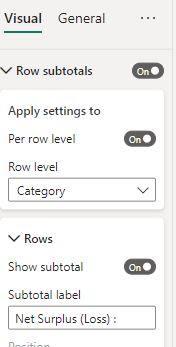
You can change this.
It is the Rows Subtotal label for that Row level (SubRegion)
@Anonymous,
There is already an idea, you may leave a comment and vote it up.
Not aware of a default way of doing that. If the matrix will always be the same size, you could overlay it with a Text box with an opaque background.
The Power BI Data Visualization World Championships is back! Get ahead of the game and start preparing now!
| User | Count |
|---|---|
| 38 | |
| 38 | |
| 37 | |
| 28 | |
| 28 |
| User | Count |
|---|---|
| 124 | |
| 89 | |
| 73 | |
| 66 | |
| 65 |