Join us at FabCon Atlanta from March 16 - 20, 2026, for the ultimate Fabric, Power BI, AI and SQL community-led event. Save $200 with code FABCOMM.
Register now!The Power BI Data Visualization World Championships is back! Get ahead of the game and start preparing now! Learn more
Hi,
I have connected the data from sqlserver database to PowerBi and have uploaded the tables. I have to now change the Negative values in the Demand_Mv/Hr column into Positive by removing the Negative sign before it and multiply the data with 1000. Has anyone have edited/Changed the data for their needs ? Can anyone provide a solution to this ?
Solved! Go to Solution.
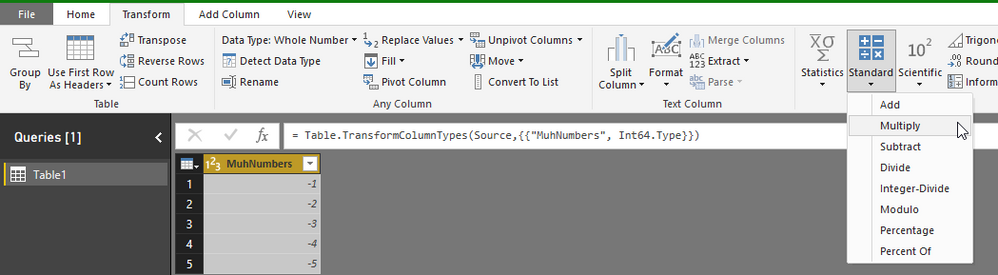
Yep, this is pretty easy to do with the Transform tab. You could also just write a line of M into the Advanced Editor.
Here's a couple of screenshots. Let me know if you're not clear on any of the steps.Use "standard" operations
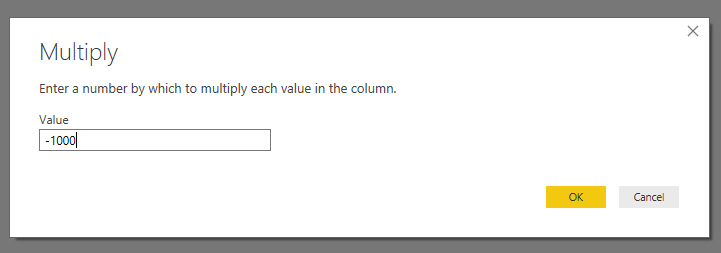
If you know everything will be negative, you can simply multiply by -1000
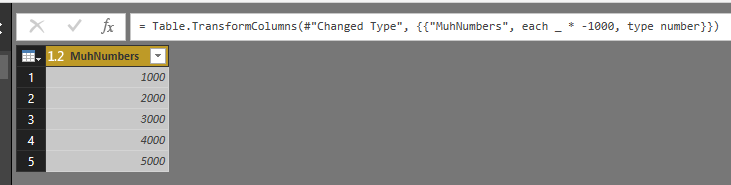
The result
Yep, this is pretty easy to do with the Transform tab. You could also just write a line of M into the Advanced Editor.
Here's a couple of screenshots. Let me know if you're not clear on any of the steps.Use "standard" operations
If you know everything will be negative, you can simply multiply by -1000
The result
@Anonymous: Thanks for the screenshot and the code in Advanced editor. It was easy for me to undesrstand as i am new to the PowerBI.
Hi, You can do all this in Query Editor.
With Transformation Actions.
Victor
Lima Peru
The Power BI Data Visualization World Championships is back! Get ahead of the game and start preparing now!
| User | Count |
|---|---|
| 39 | |
| 37 | |
| 33 | |
| 32 | |
| 29 |
| User | Count |
|---|---|
| 132 | |
| 88 | |
| 82 | |
| 68 | |
| 64 |