Don't miss your chance to take the Fabric Data Engineer (DP-600) exam for FREE! Find out how by attending the DP-600 session on April 23rd (pacific time), live or on-demand.
Learn moreNext up in the FabCon + SQLCon recap series: The roadmap for Microsoft SQL and Maximizing Developer experiences in Fabric. All sessions are available on-demand after the live show. Register now
Good morning,
I created a calculated column in query editor ages ago, and i've realised that for some reason it's stopped working properly so I want to check what it's doing.
I want to view/edit the formula, but I don't know how to do this.
I'm in Query Editor, i've got the column highlighted, how do I edit?
Thanks!
Jemma
Solved! Go to Solution.
hi Jemma
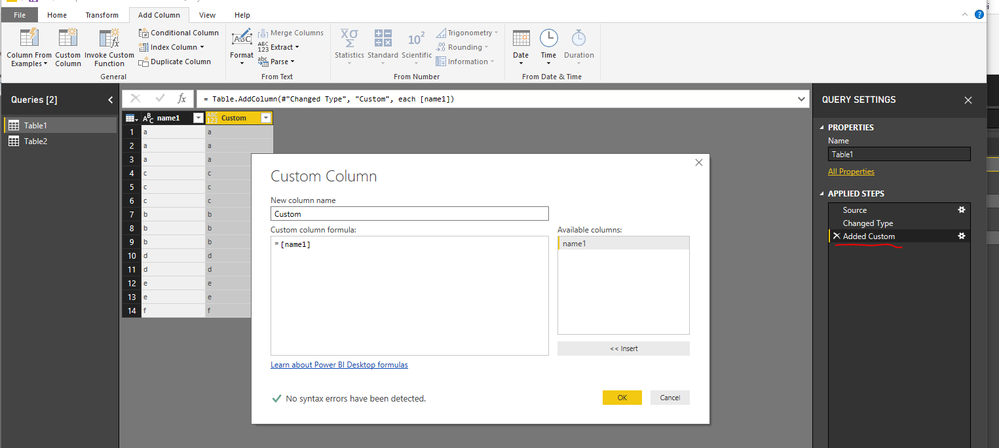
in View ribbon you need the Query Settings pane enabled - it shows list of steps in currently selected query
you need to identify the step which added the column and click on the gear icon next to it - it will bring back the add column window, where you can edit
Hi @Anonymous,
Just double left cilck the step in the APPLIED STEPS field, then you can edit the formula.
Regards,
Frank
Hi @Anonymous,
Just double left cilck the step in the APPLIED STEPS field, then you can edit the formula.
Regards,
Frank
hi Jemma
in View ribbon you need the Query Settings pane enabled - it shows list of steps in currently selected query
you need to identify the step which added the column and click on the gear icon next to it - it will bring back the add column window, where you can edit
If you have recently started exploring Fabric, we'd love to hear how it's going. Your feedback can help with product improvements.
A new Power BI DataViz World Championship is coming this June! Don't miss out on submitting your entry.
Experience the highlights from FabCon & SQLCon, available live and on-demand starting April 14th.
| User | Count |
|---|---|
| 48 | |
| 40 | |
| 40 | |
| 20 | |
| 16 |
| User | Count |
|---|---|
| 70 | |
| 67 | |
| 32 | |
| 27 | |
| 26 |