cancel
Showing results for 
Search instead for 
Did you mean: 

July 7 - July 17 | Round 2 of the Power BI Dataviz World Championships. Don't miss your chance! Learn more

Reply
Anonymous
Not applicable

Edit Query option not visible

Hi 

I was not able to look at the EDIT QUERIES option in power bi desktop. I was able to locate other options like Enter data, Get Data, Excel...etc. I try to download latest power bi desktop and install couple of times but of no luck. Please help.

Thanks, Krishna

1 ACCEPTED SOLUTION
v-chuncz-msft
Community Support
Community Support

@Anonymous 


See this blog to learn more about the updated ribbon and share feedback here.

Community Support Team _ Sam Zha
If this post helps, then please consider Accept it as the solution to help the other members find it more quickly.

View solution in original post

6 REPLIES 6
v-chuncz-msft
Community Support
Community Support

@Anonymous 


See this blog to learn more about the updated ribbon and share feedback here.

Community Support Team _ Sam Zha
If this post helps, then please consider Accept it as the solution to help the other members find it more quickly.

In my case, the reason I could not edit my Query was because my "Large semantic model storage format" was set to "On".  Once I turned it off and it finished converting, I was able to download my pbix and edit my query again.

Gordonlilj
Solution Sage
Solution Sage

Hi,


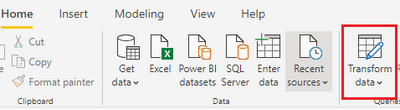
Are you using the updated ribbon? In that case it's called "Transform data" instead of edit queries


cap.PNG

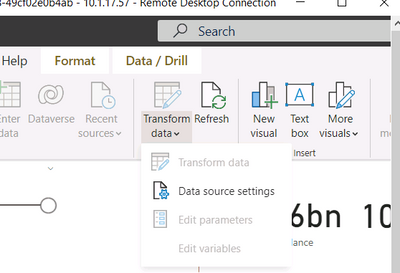
Hi under transform data all the options are disabled except ds settings. Please guide how to enable this for editing the data query 


mumer_0-1645023520249.png


Anonymous
Not applicable

Got it, thank you so much for the clarification. 

This is where I can create any new measures/calculations? 

Appreciate for help.


Thanks - Krishna

The power query is used for data transformations and such but not measures.

Measures are created in the report view

Helpful resources

Announcements
FabCon and SQLCon Barcelona 2026

FabCon & SQLCon – Barcelona 2026

Join us in Barcelona for FabCon and SQLCon, the Fabric, Power BI, SQL, and AI community event. Save €200 with code FABCMTY200.

60 days of Data Days Carousel

Data Days 2026

Join Fabric Data Days 2026: 60 days of free live/on-demand sessions, challenges, study groups, and certification opportunities.

Power BI DataViz World Championships carousel

Power BI DataViz World Championships - June 2026

A new Power BI DataViz World Championship is coming this June! Don't miss out on submitting your entry.