HI, @Anonymous
After my research, you could try this formula as Plan measure
Plan Line =
IF (
    MAX ( fact_ManhourProgress[Date] ) >= TODAY (),
    CALCULATE (
        SUM ( fact_ManhourProgress[Value] ),
        FILTER (
            ALLSELECTED ( fact_ManhourProgress ),
            fact_ManhourProgress[Date] <= MAX ( 'fact_ManhourProgress'[Date] )
                && fact_ManhourProgress[Date] >= TODAY ()
        ),
        FILTER (
            ALLSELECTED ( fact_ManhourProgress ),
            fact_ManhourProgress[Type] = "Current"
        ),
        FILTER (
            ALLSELECTED ( fact_ManhourProgress ),
            fact_ManhourProgress[Spreadsheet Field] = "Remaining Units"
        )
    )
        + CALCULATE (
            SUM ( fact_ManhourProgress[Value] ),
            FILTER (
                ALLSELECTED ( fact_ManhourProgress ),
                fact_ManhourProgress[Date] <= MAX ( fact_ManhourProgress[Date] )
                    && fact_ManhourProgress[Date] <= TODAY ()
            ),
            FILTER (
                ALLSELECTED ( fact_ManhourProgress ),
                fact_ManhourProgress[Type] = "Current"
            ),
            FILTER (
                ALLSELECTED ( fact_ManhourProgress ),
                fact_ManhourProgress[Spreadsheet Field] = "Actual Units"
            )
        )
)
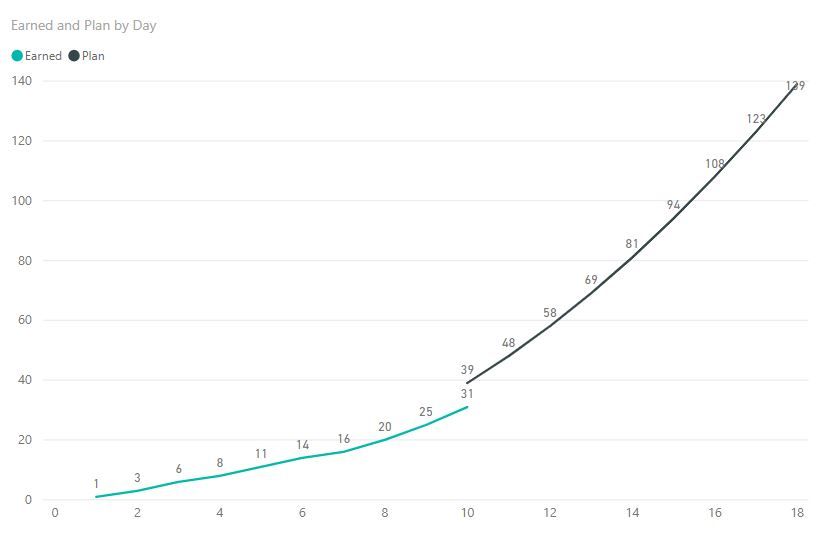
For example:
In my sample example:
Best Regards,
Lin
Community Support Team _ Lin
If this post helps, then please consider Accept it as the solution to help the other members find it more quickly.


