Don't miss your chance to take exam DP-600 or DP-700 on us!
Request nowLearn from the best! Meet the four finalists headed to the FINALS of the Power BI Dataviz World Championships! Register now
Hi there,
Is it possible to have a dynamic text box? Specfically, if I open a page by drilling down / filter, I would like to have a text box at the top with a large font header showing the drill down. For example, imagine you have a list of projects and clicking on the project shows a Project Details Drill Down Page. I would want that secondary page to have a header at the top with the Project Name.
Any thoughts here? I'm surprised there are no properties for the text box object?!?!?
-Brett
Solved! Go to Solution.
Hi @Anonymous
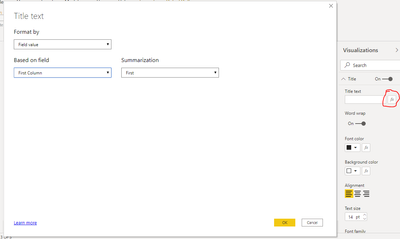
you can use dynamic Title text functionality for Text Box:
This was 2 years ago, but if anyone is interested, I think you could try making a tooltip. You hover your mouse over it and you can get information from another view, and it's another view you configure it however you want.
Hi @Anonymous
you can use dynamic Title text functionality for Text Box:
Thanks @az38! Did a bit more digging and found a trick to build upon this where you create a "value" for the chart title of whatever you want. Essentially you add the value with whatever text and calculations (i.e. "Project: [Project Number]") you want and then reference that value where you mentioned under visualizations.
Share feedback directly with Fabric product managers, participate in targeted research studies and influence the Fabric roadmap.
Check out the February 2026 Power BI update to learn about new features.
| User | Count |
|---|---|
| 50 | |
| 40 | |
| 37 | |
| 14 | |
| 14 |
| User | Count |
|---|---|
| 85 | |
| 69 | |
| 38 | |
| 29 | |
| 27 |