Learn from the best! Meet the four finalists headed to the FINALS of the Power BI Dataviz World Championships! Register now
Hi there,
Is it possible to have a dynamic text box? Specfically, if I open a page by drilling down / filter, I would like to have a text box at the top with a large font header showing the drill down. For example, imagine you have a list of projects and clicking on the project shows a Project Details Drill Down Page. I would want that secondary page to have a header at the top with the Project Name.
Any thoughts here? I'm surprised there are no properties for the text box object?!?!?
-Brett
Solved! Go to Solution.
Hi @Anonymous
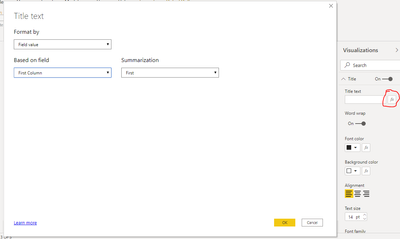
you can use dynamic Title text functionality for Text Box:
This was 2 years ago, but if anyone is interested, I think you could try making a tooltip. You hover your mouse over it and you can get information from another view, and it's another view you configure it however you want.
Hi @Anonymous
you can use dynamic Title text functionality for Text Box:
Thanks @az38! Did a bit more digging and found a trick to build upon this where you create a "value" for the chart title of whatever you want. Essentially you add the value with whatever text and calculations (i.e. "Project: [Project Number]") you want and then reference that value where you mentioned under visualizations.
| User | Count |
|---|---|
| 58 | |
| 46 | |
| 31 | |
| 17 | |
| 16 |
| User | Count |
|---|---|
| 78 | |
| 66 | |
| 45 | |
| 25 | |
| 22 |