Learn from the best! Meet the four finalists headed to the FINALS of the Power BI Dataviz World Championships! Register now
Solved! Go to Solution.
Hi @yslee ,
You can create a calendar table as a slicer to filter the data in Data table.
Calendar Date = CALENDAR(DATE(2021,04,01),DATE(2021,04,30))
Then create a measure to return the 7 days back production data.
last 7 days products = CALCULATE(SELECTEDVALUE('Table'[Product]),FILTER('Table','Table'[Date]>MAX('Calendar Date'[Date])-7 && 'Table'[Date]<=MAX('Calendar Date'[Date])))
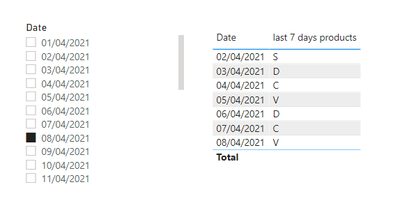
The effect is as shown:
Best Regards
Community Support Team _ Ailsa Tao
If this post helps, then please consider Accept it as the solution to help the other members find it more quickly.
Hi @yslee ,
You can create a calendar table as a slicer to filter the data in Data table.
Calendar Date = CALENDAR(DATE(2021,04,01),DATE(2021,04,30))
Then create a measure to return the 7 days back production data.
last 7 days products = CALCULATE(SELECTEDVALUE('Table'[Product]),FILTER('Table','Table'[Date]>MAX('Calendar Date'[Date])-7 && 'Table'[Date]<=MAX('Calendar Date'[Date])))
The effect is as shown:
Best Regards
Community Support Team _ Ailsa Tao
If this post helps, then please consider Accept it as the solution to help the other members find it more quickly.
@yslee , if you select a date and plot more than that date , you need an independent date table https://www.youtube.com/watch?v=44fGGmg9fHI
| User | Count |
|---|---|
| 55 | |
| 37 | |
| 23 | |
| 17 | |
| 17 |
| User | Count |
|---|---|
| 69 | |
| 58 | |
| 39 | |
| 21 | |
| 21 |