Join us at FabCon Atlanta from March 16 - 20, 2026, for the ultimate Fabric, Power BI, AI and SQL community-led event. Save $200 with code FABCOMM.
Register now!The Power BI Data Visualization World Championships is back! Get ahead of the game and start preparing now! Learn more
Hi Friends,
How can I dynamically change visualization column based on slicer selection?
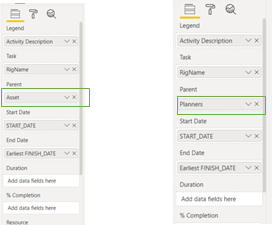
I have gantt chart in which I want to add a toggle slicer which changes the field value.
Changing the parent in the chart as per the selection.
Any trick or workaround for the same will be much appreciated. Thanks in advance!!
Solved! Go to Solution.
@Devjeet ,
The first thing that comes to mind would be to duplicate the visuals and when your user toggles their selection between the buttons the necessary visual is shown on the canvas.
This can be achieved through bookmarks which RADACAD has an excellent write up on that you can review here: https://radacad.com/bookmarks-and-buttons-making-power-bi-charts-even-more-interactive
Hi @Devjeet ,
Could you please Accept @sirlanceohlott 's reply as the solution to make the thread closed ? More people will benefit from it.
Best Regards,
Eyelyn Qin
You're welcome @Devjeet, I hope this helps you get your project sorted.
Have a great day!
@Devjeet ,
The first thing that comes to mind would be to duplicate the visuals and when your user toggles their selection between the buttons the necessary visual is shown on the canvas.
This can be achieved through bookmarks which RADACAD has an excellent write up on that you can review here: https://radacad.com/bookmarks-and-buttons-making-power-bi-charts-even-more-interactive
The Power BI Data Visualization World Championships is back! Get ahead of the game and start preparing now!
| User | Count |
|---|---|
| 64 | |
| 47 | |
| 41 | |
| 36 | |
| 23 |
| User | Count |
|---|---|
| 185 | |
| 123 | |
| 106 | |
| 78 | |
| 52 |