cancel
Showing results for 
Search instead for 
Did you mean: 

The Power BI Data Visualization World Championships is back! Get ahead of the game and start preparing now! Learn more

Reply
GaRaGe
New Member

Dynamically calculating difference between two columns in a matrix table

For illustration purpose, i am using excel but the solution i need is for Power BI. Also, this is a small sample used as an example, my real data is quite huge. 


I have 3 columns (image below)


Capture.PNG


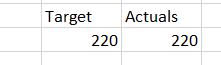
I loaded it into Power BI and trying to create a matrix table with 'Metric' as column and 'Spend' as value. So i should get some output (image below)


Capture.PNG


Now i need to add a third column in this matrix table named "Difference" that dynamically calculates the difference between the values in Target and Actuals columns. In this example it should be 0. 


How to create such column in matrix table in Power BI? 

2 REPLIES 2
MarcelBeug
Community Champion
Community Champion

Alternatively, in the query editor, you can remove "Region", pivot on Metric, rename "Actual" to "Actuals", go to "Add Column", select both columns and choose option Standard - Subtract. Adjust the generated code to have the new column named "Difference".


Code generated (the first line is specific for me entering data):


let
    Source = Table.FromRows(Json.Document(Binary.Decompress(Binary.FromText("i45WcizOTFTSUQpJLEpPLQEyDA0MlGJ14OKOySWliTlAhgVUODe1KDMZVYcRuhRck6EJUCoWAA==", BinaryEncoding.Base64), Compression.Deflate)), let _t = ((type text) meta [Serialized.Text = true]) in type table [Region = _t, Metric = _t, Spend = _t]),
    #"Changed Type" = Table.TransformColumnTypes(Source,{{"Region", type text}, {"Metric", type text}, {"Spend", type number}}),
    #"Removed Columns" = Table.RemoveColumns(#"Changed Type",{"Region"}),
    #"Pivoted Column" = Table.Pivot(#"Removed Columns", List.Distinct(#"Removed Columns"[Metric]), "Metric", "Spend", List.Sum),
    #"Renamed Columns" = Table.RenameColumns(#"Pivoted Column",{{"Actual", "Actuals"}}),
    #"Inserted Subtraction" = Table.AddColumn(#"Renamed Columns", "Difference", each [Target] - [Actuals], type number)
in
    #"Inserted Subtraction"


Specializing in Power Query Formula Language (M)
Greg_Deckler
Community Champion
Community Champion

I'm not sure that your data is in the best format for what you are trying to accomplish, but you could do something like this and add it to Value area:


Measure = CALCULATE(SUM(Difference[Spend]),Difference[Metric]="Target") - CALCULATE(SUM(Difference[Spend]),Difference[Metric]="Actual") 


Follow on LinkedIn
@ me in replies or I'll lose your thread!!!
Instead of a Kudo, please vote for this idea
Become an expert!: Enterprise DNA
External Tools: MSHGQM
YouTube Channel!: Microsoft Hates Greg
Latest book!:
DAX For Humans

DAX is easy, CALCULATE makes DAX hard...

Helpful resources

Announcements
Power BI DataViz World Championships

Power BI Dataviz World Championships

The Power BI Data Visualization World Championships is back! Get ahead of the game and start preparing now!

December 2025 Power BI Update Carousel

Power BI Monthly Update - December 2025

Check out the December 2025 Power BI Holiday Recap!

FabCon Atlanta 2026 carousel

FabCon Atlanta 2026

Join us at FabCon Atlanta, March 16-20, for the ultimate Fabric, Power BI, AI and SQL community-led event. Save $200 with code FABCOMM.