Join us at FabCon Atlanta from March 16 - 20, 2026, for the ultimate Fabric, Power BI, AI and SQL community-led event. Save $200 with code FABCOMM.
Register now!The Power BI Data Visualization World Championships is back! Get ahead of the game and start preparing now! Learn more
Hi,
My requirement is create measure which calculate distinct count of rows and i have one date column which i need to check with user selected Date slicer.
Solved! Go to Solution.
Hi @Anonymous ,
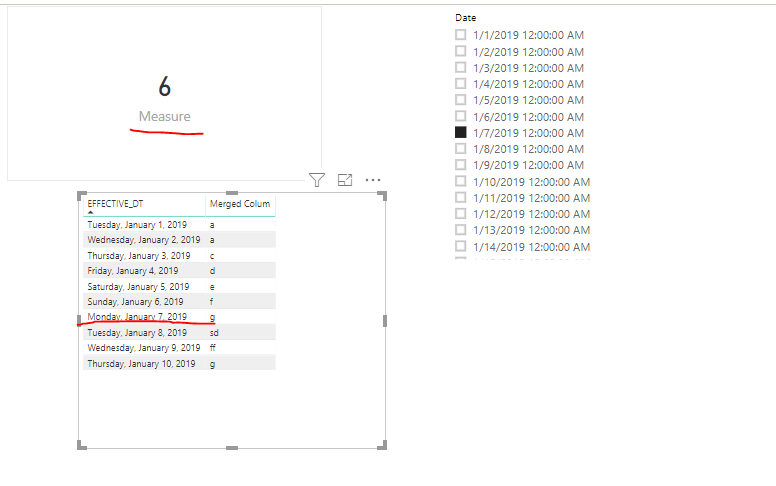
Did you create relationship between date table and the fact table in your scenario? Here I created a sample for your reference.
Measure = CALCULATE(DISTINCTCOUNT(NETWORK[Merged Colum]),FILTER('NETWORK','NETWORK'[EFFECTIVE_DT]<=SELECTEDVALUE('Date'[Date])))
Pbix as attached.
Hi,
Create a relationship from the EFFECTIVE_DT column to the Start Date column of the Date Table. Create a slicer and drag Start Date column from the Date Table. Select a Date there. Write these measure
Count = DISTINCTCOUNT(NETWORK[Merged Colum])
CONTROL PROVIDERS = CALCULATE([Count],DATESBETWEEN('Date'[Start_Date],MINX(ALL(Date),'Date'[Start_Date]),MAX('Date'[Start_Date])))
Hope this helps.
Hi,
Create a relationship from the EFFECTIVE_DT column to the Start Date column of the Date Table. Create a slicer and drag Start Date column from the Date Table. Select a Date there. Write these measure
Count = DISTINCTCOUNT(NETWORK[Merged Colum])
CONTROL PROVIDERS = CALCULATE([Count],DATESBETWEEN('Date'[Start_Date],MINX(ALL(Date),'Date'[Start_Date]),MAX('Date'[Start_Date])))
Hope this helps.
Hi @Anonymous ,
Did you create relationship between date table and the fact table in your scenario? Here I created a sample for your reference.
Measure = CALCULATE(DISTINCTCOUNT(NETWORK[Merged Colum]),FILTER('NETWORK','NETWORK'[EFFECTIVE_DT]<=SELECTEDVALUE('Date'[Date])))
Pbix as attached.
The Power BI Data Visualization World Championships is back! Get ahead of the game and start preparing now!
| User | Count |
|---|---|
| 37 | |
| 37 | |
| 33 | |
| 32 | |
| 29 |
| User | Count |
|---|---|
| 130 | |
| 88 | |
| 82 | |
| 68 | |
| 64 |