This is best Fabric, Power BI, SQL and AI community event. How do we know? The last event sold out! Save €200 with code FABCMTY200.
Register nowThe Fabric community is upgrading! Read all of the details including the timeline and what you can expect. Learn more
Hello,
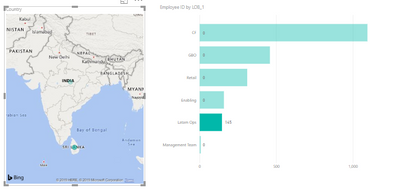
I have a table containing Country, LOB and Employee Details. I have created a map based on Country and a Bar Chart based on LOB and Count of Employees.
Based on the Selected country on the map, the Bar chart should only show the LOBs in that country and should not show LOBs with 0 (zero) headcount. Example, Sri Lanka has only 1 LOB. When Sri Lanka is selected on the map, the bar chart should only show Latam Ops with count of employees in that LOB. It is working for me if I use a slicer instead of map, but isn't working if I use a map to filter the other visual.
Solved! Go to Solution.
Hi @chandakaushik ,
You must use the edit interactions to change the way your visuals filter out other visuals.
Check the documentation on the link below:
https://docs.microsoft.com/en-us/power-bi/service-reports-visual-interactions
Regards,
MFelix
Regards
Miguel Félix
Proud to be a Super User!
Check out my blog: Power BI em PortuguêsHi @chandakaushik ,
You must use the edit interactions to change the way your visuals filter out other visuals.
Check the documentation on the link below:
https://docs.microsoft.com/en-us/power-bi/service-reports-visual-interactions
Regards,
MFelix
Regards
Miguel Félix
Proud to be a Super User!
Check out my blog: Power BI em Português@MFelix Thanks dear! I was making a very silly mistake with the interactions. This Microsoft documentation helped. Thank you for sharing!! 🙂
Join us in Barcelona for FabCon and SQLCon, the Fabric, Power BI, SQL, and AI community event. Save €200 with code FABCMTY200.
| User | Count |
|---|---|
| 24 | |
| 22 | |
| 20 | |
| 18 | |
| 14 |
| User | Count |
|---|---|
| 44 | |
| 36 | |
| 23 | |
| 20 | |
| 20 |