This is best Fabric, Power BI, SQL and AI community event. How do we know? The last event sold out! Save €200 with code FABCMTY200.
Register nowA new Data Days event is coming soon! This time we’re going bigger than ever. Fabric, Power BI, SQL, AI and more. Don't miss out.
Hi everyone,
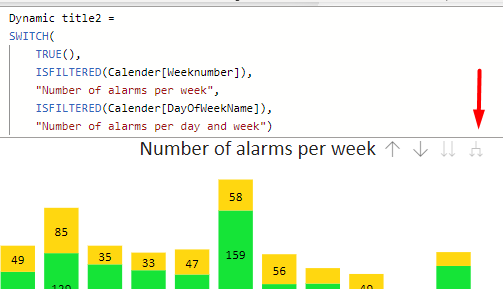
I want to have a dynamic title, changing when the user is going to the next level or expanding one level in the hierarchy. Unfortunately, it's only changing when you're going to the next level, but is doesn't chang when you're using the button expanding.
I tried the functions IsFiltered and IsInscope, but both without succes. Is there another function or a workaround for this?
Solved! Go to Solution.
Hi @igrandey89 ,
Thank you for your suggestion. I tried your measure, and adjusted a few things. However, it didn't work (Only "Default Title" became visible).
I created a workaround:
I placed a button with a bookmark on the expanding one level in the hierarchy-arrow. So when the user clicks on this, it just redirects you to another chart with a manual title. I placed a button and bookmark on this chart too, to be able to go back.
I have been searching for a while, and I noticed that more people had this issue which weren't solved. So I guess using a dynamic title by clicking on the expanding one level in the hierarchy isn't possible (yet)
If anyone is still looking for a solution to this, I've submitted it as an idea on the Ideas forum:
Let a visual title and Axes read displayed hierarc... - Microsoft Fabric Community
Hopefully it gets traction.
Awesome!!! Glad I could (sort of) help 😉
To make the dynamic title change when expanding the hierarchy instead of only when drilling down, you can use the HASONEVALUE function along with SELECTEDVALUE. Here's a modified version of your DAX measure that should work:
Dynamic title2 =
VAR CurrentLevel =
SWITCH (
TRUE (),
HASONEVALUE ( Calendar[DayOfWeekName] ), 1,
HASONEVALUE ( Calendar[Weeknumber] ), 2,
0
)
RETURN
SWITCH (
CurrentLevel,
1, "Number of alarms per day and week",
2, "Number of alarms per week",
"Default Title"
)In this measure, we first create a variable CurrentLevel to identify the current hierarchy level by checking whether the user has drilled down or expanded on the DayOfWeekName or Weeknumber. Then, we return the title based on the value of CurrentLevel.
This should update the title as you expand the hierarchy. However, depending on your data model and how your visualizations are set up, you might need to adjust this code to fit your specific case.
Hi @igrandey89 ,
Thank you for your suggestion. I tried your measure, and adjusted a few things. However, it didn't work (Only "Default Title" became visible).
I created a workaround:
I placed a button with a bookmark on the expanding one level in the hierarchy-arrow. So when the user clicks on this, it just redirects you to another chart with a manual title. I placed a button and bookmark on this chart too, to be able to go back.
I have been searching for a while, and I noticed that more people had this issue which weren't solved. So I guess using a dynamic title by clicking on the expanding one level in the hierarchy isn't possible (yet)
If it's not already submitted in the PBI Ideas site--I would suggest you do so! https://ideas.powerbi.com/
Check out the May 2026 Power BI update to learn about new features.
Sign up to receive a private message when registration opens and key events begin.
If you have recently started exploring Fabric, we'd love to hear how it's going. Your feedback can help with product improvements.
| User | Count |
|---|---|
| 31 | |
| 26 | |
| 23 | |
| 22 | |
| 13 |
| User | Count |
|---|---|
| 62 | |
| 47 | |
| 27 | |
| 23 | |
| 19 |