Get certified for free when you join Fabric Data Days 2026 and dive into Fabric, Power BI, SQL, AI, and other essential data skills.
Join nowJuly 28 - August 9 | Final Round of the Power BI Dataviz World Championships. This is your chance. Learn more
I use the following measure to have a dynamic title based on selected filters, and it works fine, but the order is not correct. When I select several values in the year filter, it does not appear correctly. It shows as year: 2020, 2018, 2019. how can I show it in the right order?
Solved! Go to Solution.
@Anonymous did you see this solution Solved: I want to "Order by" before using CONCATENATEX ...... - Microsoft Power BI Community?
Respectfully,
Zoe Douglas (DataZoe)
Follow me on LinkedIn at https://www.linkedin.com/in/zoedouglas-data
See my reports and blog at https://www.datazoepowerbi.com/
Hi @Anonymous
Due to I don't know your data model, and have a test by a sample table and your measure.
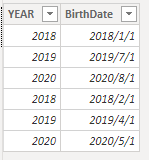
My Sample table:
Your measure result:
It seems to work well. By default it will order your value by asc.
Could you show me your datas and data model by a sample?
Or you can share your pbix file with me by your Onedrive for Business.
Best Regards,
Rico Zhou
If this post helps, then please consider Accept it as the solution to help the other members find it more quickly.
@Anonymous did you see this solution Solved: I want to "Order by" before using CONCATENATEX ...... - Microsoft Power BI Community?
Respectfully,
Zoe Douglas (DataZoe)
Follow me on LinkedIn at https://www.linkedin.com/in/zoedouglas-data
See my reports and blog at https://www.datazoepowerbi.com/
If you love stickers, then you will definitely want to check out our community sticker challenge, Barcelona edition!
Check out the July 2026 Power BI update to learn about new features.
| User | Count |
|---|---|
| 26 | |
| 23 | |
| 22 | |
| 20 | |
| 18 |
| User | Count |
|---|---|
| 35 | |
| 28 | |
| 21 | |
| 19 | |
| 17 |