cancel
Showing results for 
Search instead for 
Did you mean: 

Vote for your favorite vizzies from the Power BI Dataviz World Championship submissions. Vote now!

Reply
Plfrcs
Frequent Visitor

Dynamic range CALENDAR with RLS

Hello,


I want to set up a calendar that scales according to the minimum and maximum date of a column for each of the RLS roles.


Example:


- Global role :
Min column date : 01/01/2021, Max column date: 12/31/2021
Calendar start date : 01/01/2021, Calendar end date: 31/12/2021
Year month segment : 01/21 to 12/2021


- Role 1 :

Minimum date column : 05/06/2021, Maximum date column: 25/07/2021
Calendar start date : 05/06/2021 , Calendar end date: 25/07/2021
Year month Slicer : 06/21 to 07/2021


- Role 2:
Minimum date column : 08/09/2021, Maximum date column: 10/11/2021
Calendar start date : 08/09/2021 , Calendar end date: 10/11/2021
Year month Slicer : 09/21 to 11/2021


By setting the calendar start date to MIN(table[column date]) or FIRSTDATE(table[column date]) , the MIN/FIRSTDATE functions bypasses the RLS by always bringing up the global minimum date


Thanks

1 ACCEPTED SOLUTION
Aburar_123
Solution Supplier
Solution Supplier

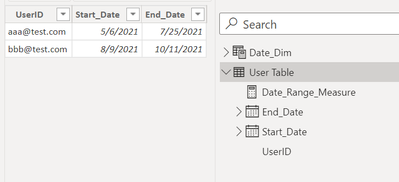
Hi @Plfrcs ,


Please find the below solution,


Aburar_123_1-1639881700571.png

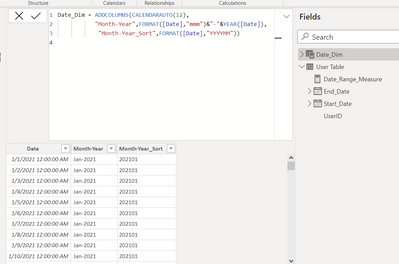
Date Dimension table,

Aburar_123_2-1639881768111.png

Create the below measure,


Date_Range_Measure =

IF(MAX(Date_Dim[Date])>=MIN('User Table'[Start_Date]) && format(MAX(Date_Dim[Date]),"YYYYMM")<=FORMAT(MAX('User Table'[end_Date]),"YYYYMM"),1,0)
 
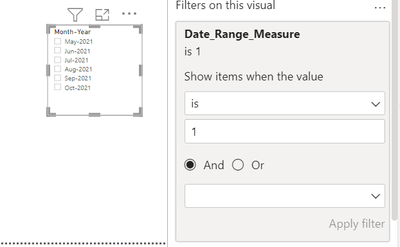
Create a slicer using Month-Year column in the Date_Dim table and place the above created measure into the Visual level filter and set its value as 1,
 
Aburar_123_3-1639881929781.png

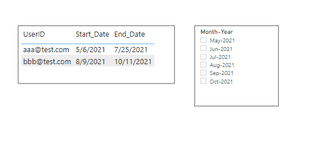
By default it would be like below,

Aburar_123_4-1639881964325.png


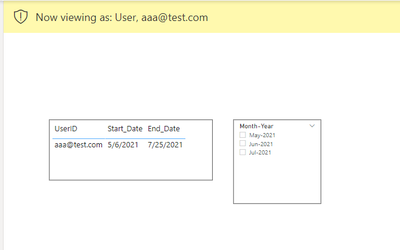
While you do the RLS based on the user, Dates in the slicer will be based upon the selected user as below,


Aburar_123_6-1639882086476.png

Please like and mark my post as a solution if it answers your question. Thanks.


View solution in original post

2 REPLIES 2
Aburar_123
Solution Supplier
Solution Supplier

Hi @Plfrcs ,


Please find the below solution,


Aburar_123_1-1639881700571.png

Date Dimension table,

Aburar_123_2-1639881768111.png

Create the below measure,


Date_Range_Measure =

IF(MAX(Date_Dim[Date])>=MIN('User Table'[Start_Date]) && format(MAX(Date_Dim[Date]),"YYYYMM")<=FORMAT(MAX('User Table'[end_Date]),"YYYYMM"),1,0)
 
Create a slicer using Month-Year column in the Date_Dim table and place the above created measure into the Visual level filter and set its value as 1,
 
Aburar_123_3-1639881929781.png

By default it would be like below,

Aburar_123_4-1639881964325.png


While you do the RLS based on the user, Dates in the slicer will be based upon the selected user as below,


Aburar_123_6-1639882086476.png

Please like and mark my post as a solution if it answers your question. Thanks.


lbendlin
Super User
Super User

You have to distinguish between row filtering (what RLS does) and DAX function basics - if you use a function like CALENDARAUTO it will always create full calendar year ranges even if you limit the fact dates.


Use your own Calendar table, and refrain from using certain DAX time intelligence functions.

Helpful resources

Announcements
Power BI DataViz World Championships

Power BI Dataviz World Championships

Vote for your favorite vizzies from the Power BI World Championship submissions!

Sticker Challenge 2026 Carousel

Join our Community Sticker Challenge 2026

If you love stickers, then you will definitely want to check out our Community Sticker Challenge!

January Power BI Update Carousel

Power BI Monthly Update - January 2026

Check out the January 2026 Power BI update to learn about new features.

FabCon Atlanta 2026 carousel

FabCon Atlanta 2026

Join us at FabCon Atlanta, March 16-20, for the ultimate Fabric, Power BI, AI and SQL community-led event. Save $200 with code FABCOMM.