cancel
Showing results for 
Search instead for 
Did you mean: 

Try your skills in the Power BI Dataviz World Championship! Round one ends June 26. Join now

Reply
mkrumpak
Regular Visitor

Dynamic filtering question

Hi,


I would like to implement a slicer-like-control on a column that contains a list of values as shown in the example below, where item 1 has tags a, b, c, d, and e.


DATA SET

item      tag

1            a, b, c, d, e

2            a, b

3            a, b

4            b, c

5                                                      


The first ask is to generate a list of distinct values in column “tag”, so they can be displayed in the slicer filter control.

The second ask is to provide filtering functionality as follows:


Example 1) If tag “c” is selected then show {1, 4}


EXPECTED REPORT RESULT SET

item      tag

1            a, b, c, d, e

4            b, c


Example 2) If tags “c” and “b” are selected then show {1, 2, 3, 4}


EXPECTED REPORT RESULT SET

item      tag

1            a, b, c, d, e

2            a, b

3            a, b

4            b, c


Any suggestions for how to best implement this type of filtering in PowerBI?

3 REPLIES 3
v-sihou-msft
Microsoft Employee
Microsoft Employee

@mkrumpak


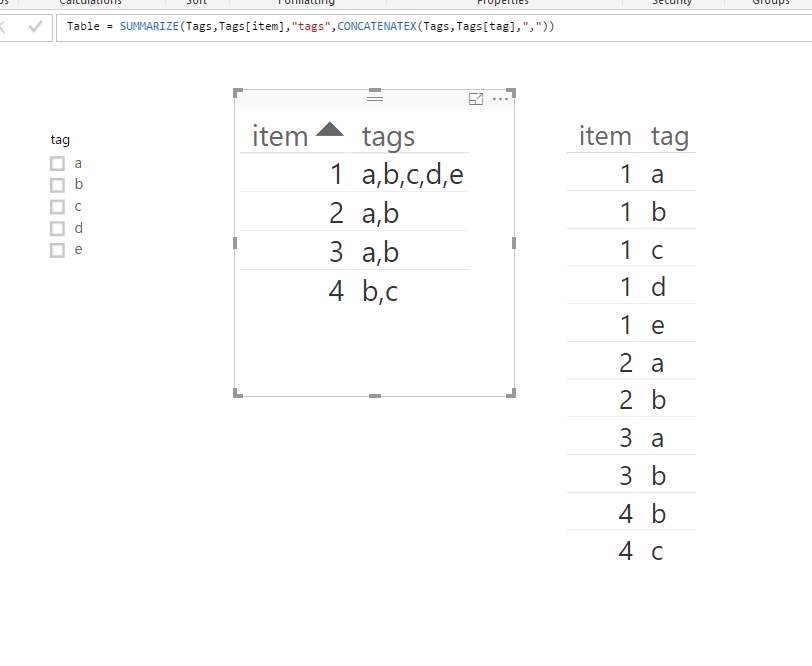
In this scenario, you can create a calculated table first to aggregate the tags together.


Table = SUMMARIZE(Tags,Tags[item],"tags",CONCATENATEX(Tags,Tags[tag],","))

9.PNG


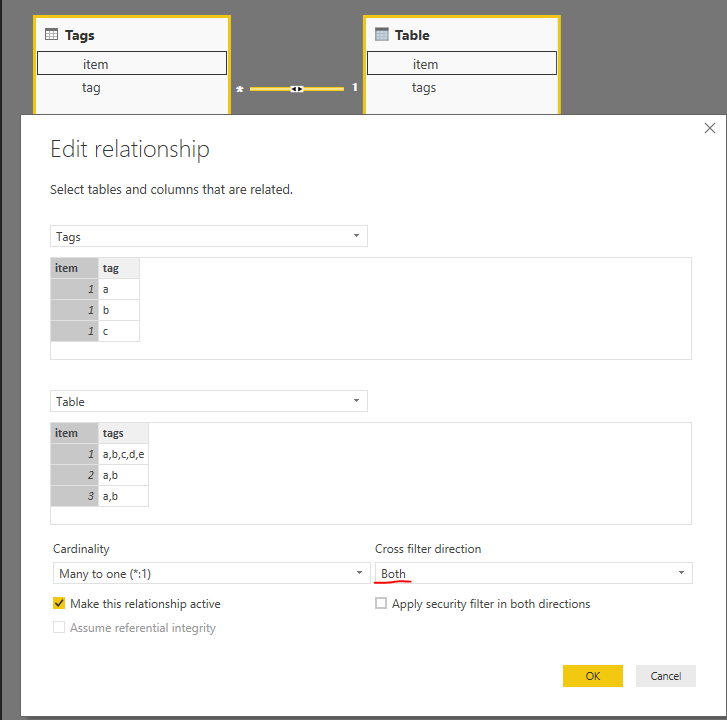
Then build the relationship between two tables, and set "Both" direction filter.


8.PNG


Now you can filter the expected result based on tag selection.


777.PNG


Regards,

Thank you for the reply.  


I am not able to create a calculated table that matches yours.  When I use yor formula  Table = SUMMARIZE(Tags,Tags[item],"tag",CONCATENATEX(Tags,Tags[tags],",")), I get a table that matches the original table.


When I create a table you described in the post manually, filtering works great!  Any chance you can elaborate on how to "unpivot" a row with a calculated Table?


Anonymous
Not applicable

You will want to use "Power Query" (edit queries) to split the fields out into many columns.... then "unpivot" them.  Both are easy to do in Edit Queries functionality.


1   a

1   b

1   c

...

2  a

2  b

3  a

...

Helpful resources

Announcements
Fabric Data Days is here Carousel

Fabric Data Days 2026

Don't miss out on Data Days, June 15 through August 7. Learn Fabric, Power BI, SQL, AI and more.

May Power BI Update Carousel

Power BI Monthly Update - May 2026

Check out the May 2026 Power BI update to learn about new features.

Power BI DataViz World Championships carousel

Power BI DataViz World Championships - June 2026

A new Power BI DataViz World Championship is coming this June! Don't miss out on submitting your entry.