cancel
Showing results for 
Search instead for 
Did you mean: 

Data Days is here! Join us now for 60+ days of learning, challenges, and connection. Learn more

Reply
bo_afk
Post Patron
Post Patron

Dynamic date title

Hi,


I'm creating a report that gets refreshed every Sunday. On the title of the report, I want it to display "Sunday, [day of month] [month]" dynamically. i.e. this will change every week when the report is refreshed.


I understand we can create titles with conditional formatting, but is it possible to add a date element to this as well?


Thanks

afk

1 ACCEPTED SOLUTION
ntaylo06
Resolver II
Resolver II

Yes, this is possible.

1. Click the "Enter Data" button to create a new table and enter "Date Refreshed" in the first cell, then click "Load"

2. In this new table add a new column and make its formula

Date Refreshed = "Sunday, " & MONTH(UTCNOW()) & "/" & DAY(UTCNOW())

3. Create a card in your report that displays the Max of 'Table1'[Date Refreshed]


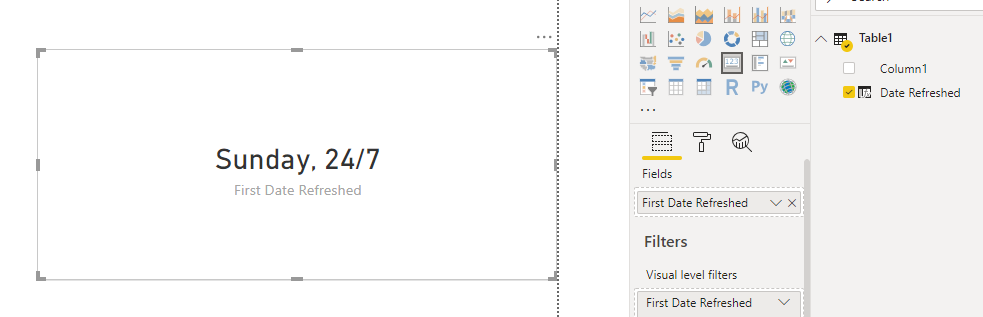
Whenever the dataset is refreshed the UTCNOW() function will find the current date and then the MONTH() and DAY() will do the math to find out what month and day the current date is. The result looks like this: 

Capture.PNG

EDIT: Oops, I'm dumb. They DAY() and MONTH() should be switched. It will still work the same


View solution in original post

2 REPLIES 2
v-piga-msft
Resident Rockstar
Resident Rockstar

Hi @bo_afk ,

The suggestion of ntaylo06 should be much helpful.

Have you solved your problem?

If you have solved, please always accept the replies making sense as solution to your question so that people who may have the same question can get the solution directly.

If you still need help, please describe your sceario in more details so that we could help further on it.

Best Regards,

Cherry


Community Support Team _ Cherry Gao
If this post helps, then please consider Accept it as the solution to help the other members find it more quickly.
ntaylo06
Resolver II
Resolver II

Yes, this is possible.

1. Click the "Enter Data" button to create a new table and enter "Date Refreshed" in the first cell, then click "Load"

2. In this new table add a new column and make its formula

Date Refreshed = "Sunday, " & MONTH(UTCNOW()) & "/" & DAY(UTCNOW())

3. Create a card in your report that displays the Max of 'Table1'[Date Refreshed]


Whenever the dataset is refreshed the UTCNOW() function will find the current date and then the MONTH() and DAY() will do the math to find out what month and day the current date is. The result looks like this: 

Capture.PNG

EDIT: Oops, I'm dumb. They DAY() and MONTH() should be switched. It will still work the same


Helpful resources

Announcements
Fabric Data Days is here Carousel

Fabric Data Days 2026

Don't miss out on Data Days, June 15 through August 7. Learn Fabric, Power BI, SQL, AI and more.

May Power BI Update Carousel

Power BI Monthly Update - May 2026

Check out the May 2026 Power BI update to learn about new features.

Power BI DataViz World Championships carousel

Power BI DataViz World Championships - June 2026

A new Power BI DataViz World Championship is coming this June! Don't miss out on submitting your entry.