This is best Fabric, Power BI, SQL and AI community event. How do we know? The last event sold out! Save €200 with code FABCMTY200.
Register nowA new Data Days event is coming soon! This time we’re going bigger than ever. Fabric, Power BI, SQL, AI and more. Don't miss out.
Hi,
I'm creating a report that gets refreshed every Sunday. On the title of the report, I want it to display "Sunday, [day of month] [month]" dynamically. i.e. this will change every week when the report is refreshed.
I understand we can create titles with conditional formatting, but is it possible to add a date element to this as well?
Thanks
afk
Solved! Go to Solution.
Yes, this is possible.
1. Click the "Enter Data" button to create a new table and enter "Date Refreshed" in the first cell, then click "Load"
2. In this new table add a new column and make its formula
3. Create a card in your report that displays the Max of 'Table1'[Date Refreshed]
Whenever the dataset is refreshed the UTCNOW() function will find the current date and then the MONTH() and DAY() will do the math to find out what month and day the current date is. The result looks like this:
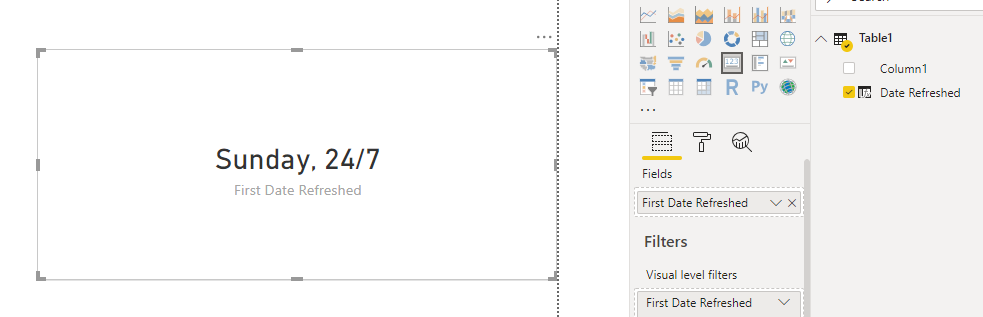
EDIT: Oops, I'm dumb. They DAY() and MONTH() should be switched. It will still work the same
Hi @bo_afk ,
The suggestion of ntaylo06 should be much helpful.
Have you solved your problem?
If you have solved, please always accept the replies making sense as solution to your question so that people who may have the same question can get the solution directly.
If you still need help, please describe your sceario in more details so that we could help further on it.
Best Regards,
Cherry
Yes, this is possible.
1. Click the "Enter Data" button to create a new table and enter "Date Refreshed" in the first cell, then click "Load"
2. In this new table add a new column and make its formula
3. Create a card in your report that displays the Max of 'Table1'[Date Refreshed]
Whenever the dataset is refreshed the UTCNOW() function will find the current date and then the MONTH() and DAY() will do the math to find out what month and day the current date is. The result looks like this:
EDIT: Oops, I'm dumb. They DAY() and MONTH() should be switched. It will still work the same
Check out the May 2026 Power BI update to learn about new features.
Sign up to receive a private message when registration opens and key events begin.
If you have recently started exploring Fabric, we'd love to hear how it's going. Your feedback can help with product improvements.
| User | Count |
|---|---|
| 32 | |
| 26 | |
| 23 | |
| 22 | |
| 15 |
| User | Count |
|---|---|
| 63 | |
| 45 | |
| 28 | |
| 24 | |
| 22 |